
If you’re coming from Windows, start with Zorin OS or Linux Mint. If your laptop is getting old but not ancient, Mint’s Xfce edition is the sweet spot. If you like tinkering and want the newest toys, pick Pop!_OS or Fedora. And if you just want the safest, most documented first step into Linux, Ubuntu is still the default answer. This guide covers all five, who each one fits, what you’ll actually get, and the honest downsides nobody puts on the download page.
Quick answer: Linux Mint 22.3 is the best first Linux distro for most beginners in 2026, it feels like Windows, installs in 20 minutes, and rarely breaks. Zorin OS 18.1 is the better pick if you want the closest possible Windows or macOS look; Ubuntu 26.04 LTS if you want the biggest community and the longest support.
The 5 beginner distros at a glance
| Distro | Best for | Desktop | Base | Why it fits beginners |
|---|---|---|---|---|
| Linux Mint 22.3 “Zena” | Ex-Windows users, older hardware | Cinnamon (MATE, Xfce editions) | Ubuntu 24.04 LTS | Windows-like layout, conservative updates, huge beginner community |
| Zorin OS 18.1 | Ex-Windows and ex-Mac users | Customized GNOME | Ubuntu 24.04 LTS | One-click Windows/macOS layouts, Windows-app migration assistant |
| Ubuntu 26.04 LTS | Anyone wanting the safest default | GNOME 50 | Ubuntu (itself) | Biggest community, best documentation, support until 2031 |
| Pop!_OS 24.04 LTS | Tinkerers, gamers, creators | COSMIC | Ubuntu 24.04 LTS | Full-disk encryption by default, great NVIDIA support, auto-tiling |
| Fedora 44 | Curious learners who like new software | GNOME 50 (KDE spin available) | Independent (Red Hat sponsored) | Always the latest software, clean defaults, no upsells |
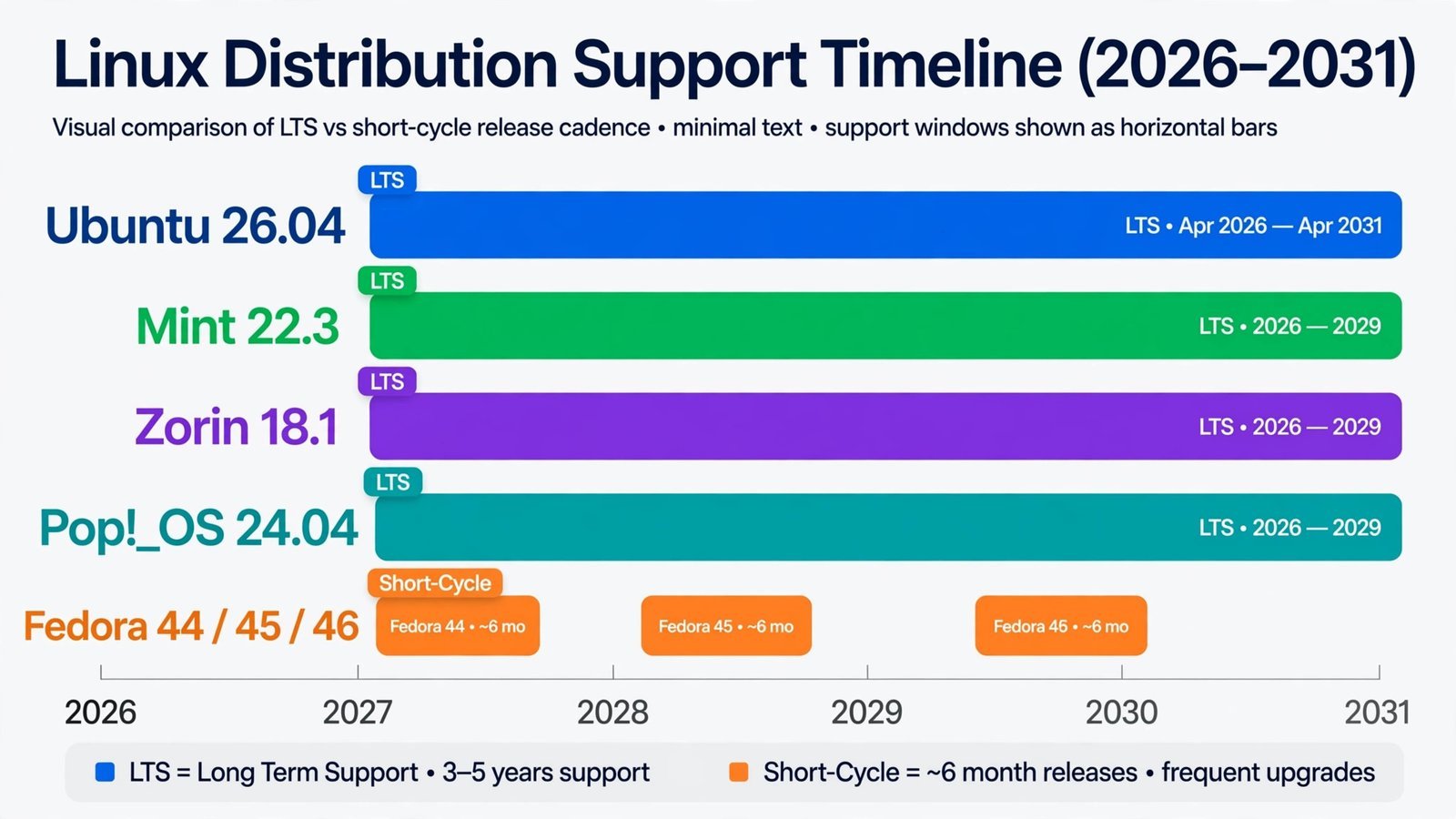
A quick glossary, since you’ll meet these terms on every download page: the desktop environment is the look-and-feel layer, the taskbar, the app menu, the settings app. LTS means Long-Term Support: one release keeps getting security updates for years, so you don’t have to reinstall or upgrade on anyone else’s schedule.

Linux Mint 22.3 “Zena”, the easiest transition from Windows
Linux Mint is the distro I recommend to friends who ask “which Linux?” and don’t want a lecture. The current release is 22.3 “Zena” (January 2026), built on Ubuntu 24.04 LTS, and it gets security updates until 2029. You install it once and forget about it.
The default Cinnamon desktop has a bottom taskbar, a Start-style menu in the corner, and system tray on the right. If you’ve used Windows, your muscle memory mostly transfers. The Software Manager works like an app store: search, read reviews, click Install. Mint also ships with media codecs out of the box, so MP3s and videos play immediately, something plain Ubuntu still makes you sort out.
What makes Mint different from Ubuntu under the hood is attitude: Mint’s Update Manager holds back riskier updates and grades the rest by safety, so your system is less likely to break after a routine update. The trade-off is you get new features later than Ubuntu users do.
Note: On hardware older than about 2012, grab the Xfce edition of Mint instead of Cinnamon. Same system underneath, much lighter desktop. If your laptop predates 2008 entirely, Mint isn’t the answer at all, see our guide to reviving an old laptop instead.
Honest downsides: Mint deliberately ships slightly older software than Fedora or Ubuntu’s interim releases. And while the community is large and beginner-focused, some answers assume the Cinnamon desktop, so they don’t always apply to the MATE or Xfce editions.
Zorin OS 18.1, the closest thing to staying where you are
Zorin OS 18.1 (April 2026), also based on Ubuntu 24.04 LTS with support until 2029, is built around one idea: switching operating systems shouldn’t feel like moving house. Its Zorin Appearance app lets you flip the desktop between Windows-like, macOS-like, and touch-friendly layouts with one click, handy if you’re leaving a Mac, which most other distros ignore.
The standout feature in the 18.x series is the Windows App Support assistant: point it at a Windows installer file and it detects what the program is, then either sets it up through a compatibility layer or suggests the closest native Linux alternative. The built-in database now covers 240+ common Windows programs. It won’t run everything, but it removes the “will my software work?” anxiety that stops most switchers.
Note: Zorin OS comes in a free Core edition and a paid Pro edition. Core is the full operating system, Pro adds extra layouts, a few more preinstalled apps, and supports the developers. You don’t need Pro to have a complete system.
Honest downsides: Zorin is a smaller team than Canonical, so release notes and documentation are thinner than Ubuntu’s. The pretty interface also means slightly more RAM use than Mint’s Cinnamon at idle. And the free edition nudges you toward the paid one during install, harmless, but worth knowing.
Ubuntu 26.04 LTS, the safest default answer
Ubuntu 26.04 LTS “Resolute Raccoon” (April 2026, supported until 2031) is the reference implementation of desktop Linux: the most users, the most tutorials, the most answered forum threads. When a hardware vendor or software company supports “Linux,” they usually mean Ubuntu. That ecosystem gravity is its real feature.
The default GNOME 50 desktop is modern and clean, though it’s the least Windows-like of the bunch, the dock sits on the left and there’s no traditional Start menu. Ubuntu’s installer is the smoothest of the five, with optional full-disk encryption offered as a simple checkbox. This release also ships the first official ARM64 desktop ISO, so it runs natively on ARM laptops.
Note: Canonical now recommends 6 GB of RAM for a comfortable Ubuntu 26.04 desktop. It will run on 4 GB, but on a machine that old, Linux Mint or a lightweight OS will feel noticeably faster.
Honest downsides: Ubuntu pushes Snap packages (its own app format), which launch slower than alternatives and can’t be fully removed without effort. The GNOME desktop is heavier than Cinnamon or Xfce. And Ubuntu 26.04 dropped the old X11 session entirely, fine for most, but a few niche apps and screen-sharing setups still prefer X11.
Pop!_OS 24.04 LTS, the tinkerer’s pick
Pop!_OS comes from System76, the company that sells Linux laptops, and it shows: this is the distro for people who want their computer to get out of the way while they build things. The 24.04 LTS release (December 2025) ships the first stable version of COSMIC, System76’s own desktop environment written in Rust, with automatic window tiling built into the compositor, windows arrange themselves into grids instead of piling up.
Two practical wins for beginners: full-disk encryption is offered (and encouraged) during install, and the separate NVIDIA ISO means proprietary graphics drivers work out of the box, no “additional drivers” treasure hunt. There’s also a unique Refresh Install option that reinstalls the OS while keeping your personal files and settings, which is the closest thing Linux has to a factory reset that doesn’t punish you.
Note: COSMIC is new, so the ecosystem of extensions and third-party themes is smaller than GNOME’s. If you live inside highly customized GNOME extensions, check they exist for COSMIC before switching.
Honest downsides: The community is smaller than Ubuntu’s or Mint’s, so obscure problems have fewer answered threads. COSMIC’s theming doesn’t apply to every app yet. And because Pop!_OS follows Ubuntu LTS releases with a delay, new hardware enablement can lag a few months behind Ubuntu itself.
Fedora 44, for the curious who want the newest everything
Fedora 44 (April 2026) is the distro for beginners who want to learn Linux, not just use it. It’s sponsored by Red Hat and sits at the front of the line: new GNOME releases, new kernels, and new tools land here months before they reach Ubuntu LTS users. The default GNOME 50 desktop is kept close to upstream, no heavy customization, no vendor lock-in to a specific app format.
Fedora’s honesty is its appeal. There’s no “pro” upsell, no proprietary app store pushing paid software, and the installer doesn’t hide what’s happening. The KDE Plasma spin is a first-class alternative if you prefer a more Windows-like layout than GNOME offers.
Note: Fedora releases a new version roughly every six months, and each release is supported for about 13 months. That means a major upgrade roughly once a year, painless with Fedora’s graphical upgrade tool, but more churn than an LTS distro. If that sounds annoying, you want Mint or Ubuntu.
Honest downsides: The six-month cadence means occasional upgrade hiccups. Proprietary codecs and some drivers aren’t included by default for licensing reasons, so playing certain media takes one extra setup step. And the community, while excellent, is smaller than Ubuntu’s, you’ll find fewer copy-paste answers for oddball hardware.
Picking yours in 60 seconds
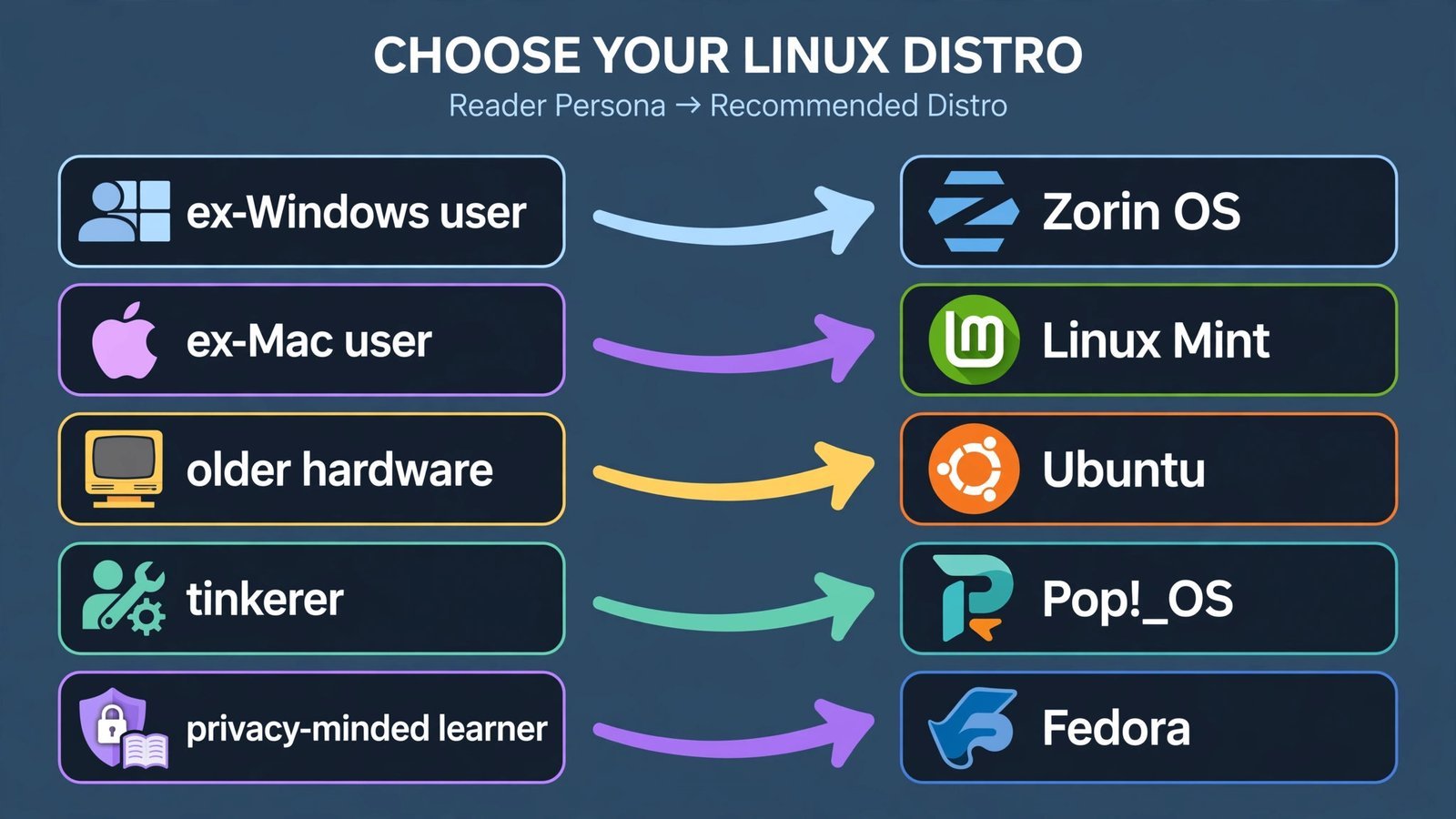
Answer one question: what did you use before, and what do you want from the switch?
- “I used Windows and I just want it to work.” Linux Mint 22.3. The layout is familiar, updates are cautious, and the forums are full of people who switched last month.
- “I used Windows/Mac and I want it to feel the same.” Zorin OS 18.1. The layout switcher and Windows-app assistant are built exactly for you.
- “I don’t know what I want; I want the safe choice.” Ubuntu 26.04 LTS. Biggest community, longest support, most third-party software targets it first.
- “I want to build, game, or tinker.” Pop!_OS 24.04 LTS. NVIDIA support, tiling, and a reinstall option that doesn’t eat your files.
- “I want to learn how Linux actually works.” Fedora 44. Newest software, no training wheels, upgrades twice a year.
From download to first boot
Whichever you pick, the process is the same: download the ISO from the distro’s official site, write it to a USB stick with a tool like Balena Etcher or Rufus, boot from the USB, and try the live desktop before installing. Every distro on this list offers a “Try before installing” mode, use it to check that your Wi-Fi, sound, and screen brightness work before you commit. And back up anything you care about from the old system first; installing an OS erases the disk you point it at.
If you’re choosing a distro for programming specifically, our guide to choosing a Linux distro for programming goes deeper on developer tooling. If the desktop itself is what you’re picky about, read about which desktop environment suits you before downloading anything.
Read next: Linux Lite vs Lubuntu, the two closest lightweight rivals, compared spec by spec.

- How to Change the Screenshot Save Location on Mac - October 24, 2026
- How to Turn Off Stage Manager on Mac - October 23, 2026
- How to Reset Your Private Space PIN on Android If You Forgot It - October 22, 2026