
Torrenting itself is legal technology, but most people searching for alternatives want the same thing: large files on their computer without ISP warning letters, sketchy pop-ups, or legal gray zones. This guide compares six 2026-current ways to download big files, from paid Usenet access to free legal torrent sources, judged on price, speed, privacy, setup effort, and legal risk. It ends with one clear pick.
How This Comparison Works
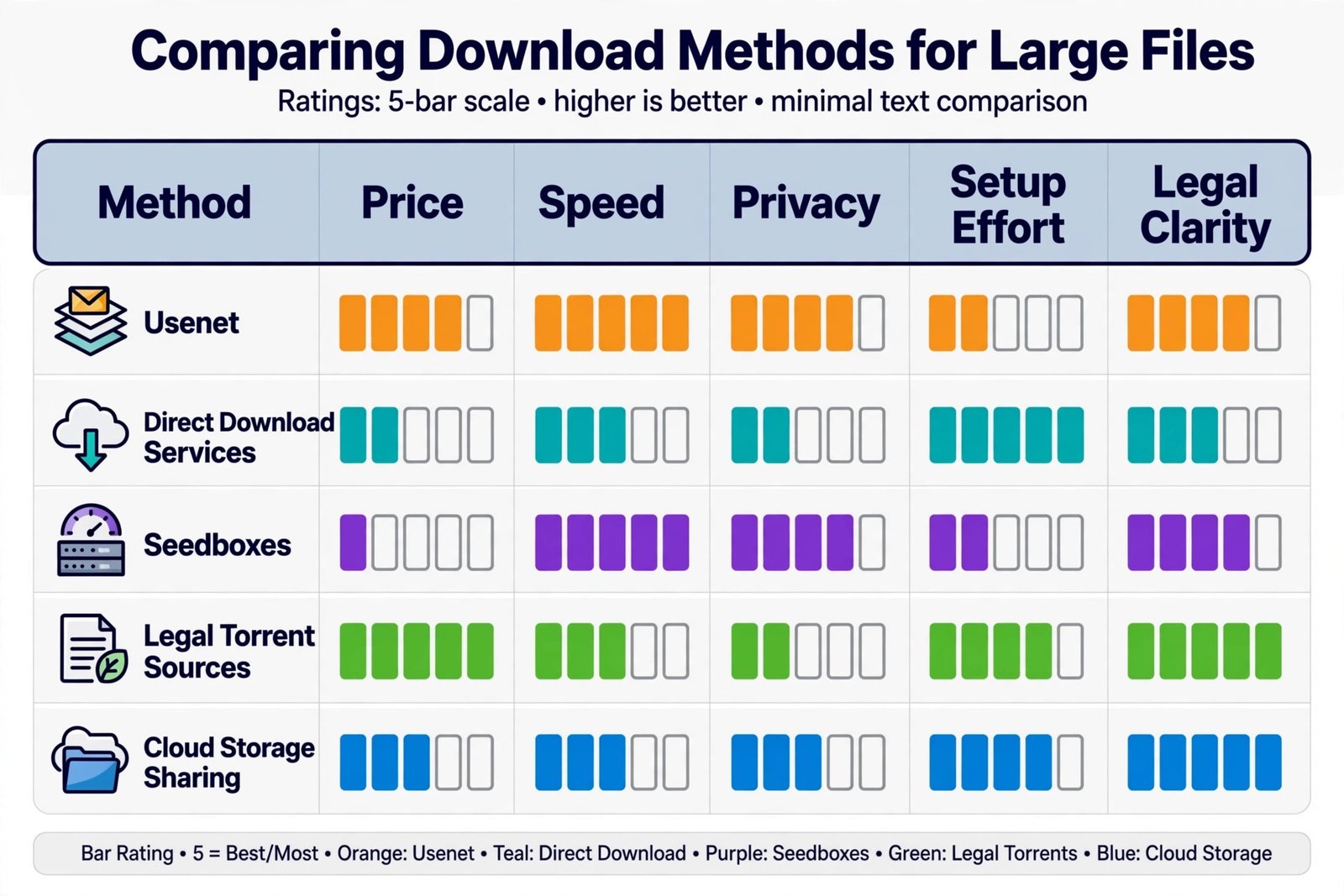
Each option below is scored against the same five criteria, because that is the only honest way to compare them.
- Price: what you actually pay per month, including hidden extras like indexers.
- Speed: whether downloads can saturate a fast connection.
- Privacy: how much of your activity is visible to your ISP or other parties.
- Setup effort: how long it takes a non-technical person to get the first download.
- Legal risk: how clearly the method stays on the right side of copyright law when used properly.
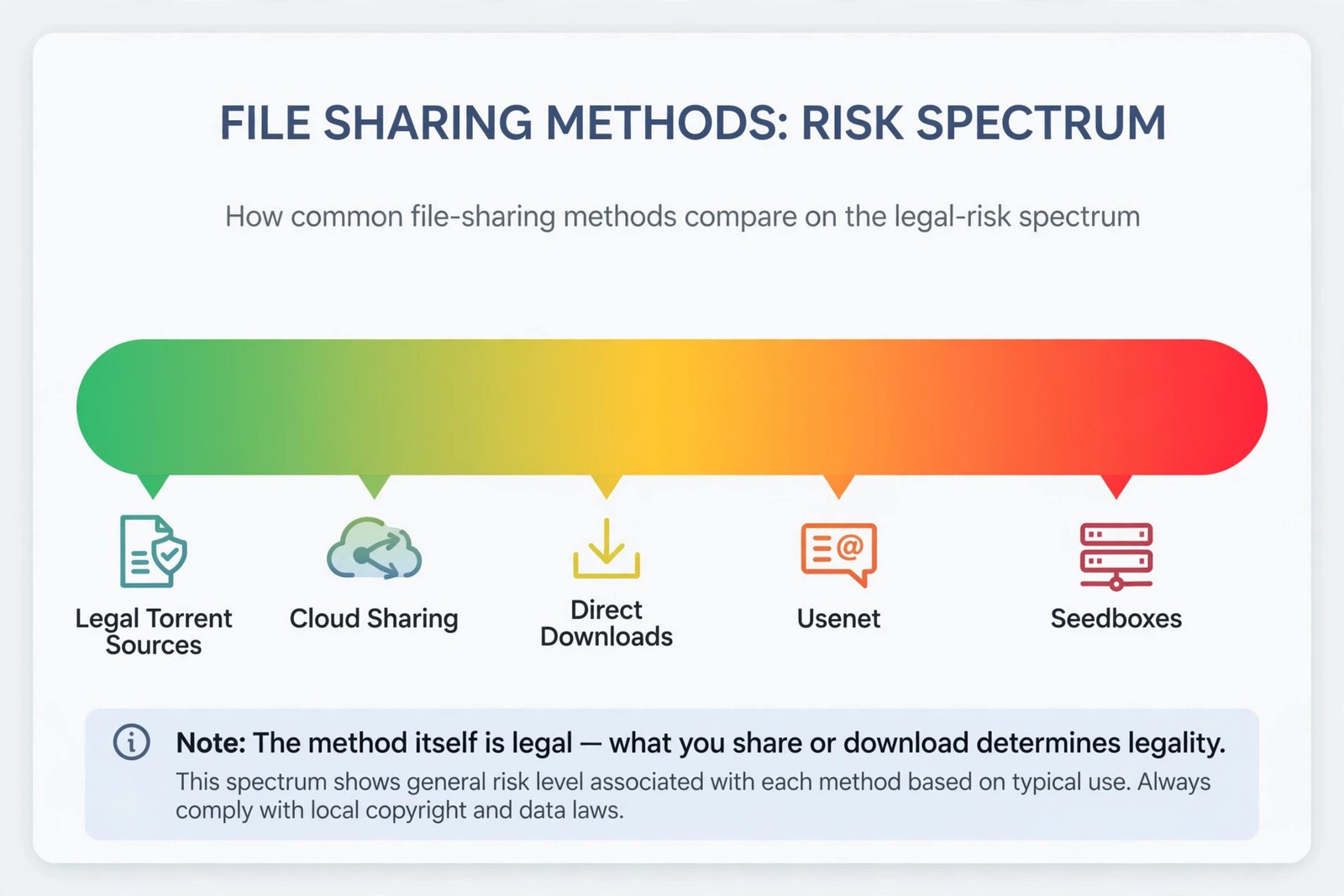
One rule applies to every option here: downloading copyrighted material without permission is illegal regardless of the method you use. A VPN or a private network does not make piracy legal; it only changes how visible you are. Everything below is described for legal downloads, which there are plenty of.
Usenet: The Fast, Private, Paid Option
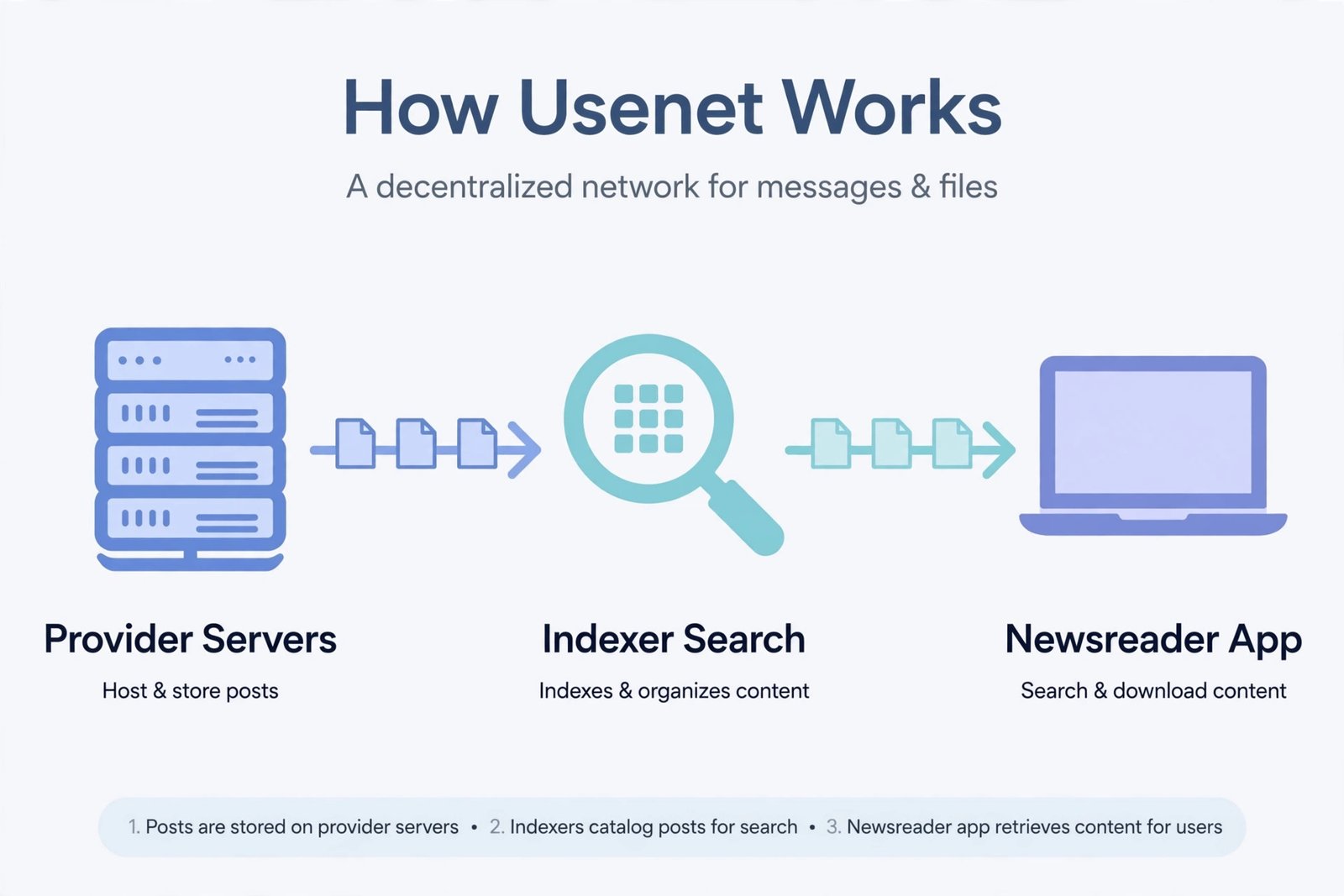
Usenet is the oldest file-sharing network on the internet and still one of the best torrent alternatives in 2026. Instead of downloading pieces from other users, you download complete files from centralized servers run by a provider, which means downloads routinely max out your connection and there is no obligation to upload for others.
Getting started takes three pieces: a subscription to a Usenet provider, a newsreader app, and an indexer, which is the search engine that finds files. Some providers bundle all three, which is the easiest route for beginners.
Our verdict: the best pick if you download large files often and want maximum speed with minimal fuss. The subscription cost is the only real downside, and it still demands respect for copyright law, since downloading protected content through Usenet is just as illegal as torrenting it.
Direct Download Services: Easiest to Start
Direct download services host files on their own fast servers and give you a plain download link in your browser. No special software, no configuration, no swarm to join. If you can download an attachment from email, you can use one of these.
Free tiers usually come with speed caps, waiting timers, and file-size limits, while paid plans remove those restrictions. The trade-off is that availability depends entirely on whether someone uploaded the file you want.
Our verdict: the best pick for occasional downloads when you value zero setup over maximum speed. Heavy downloaders will outgrow the free tiers quickly.
Seedboxes: A Remote Server That Torrents for You
A seedbox is a rented server in a data center that runs a torrent client around the clock. You add torrents through a web page, the server downloads them at data-center speeds, and then you fetch the finished files to your computer over an encrypted connection. Your home IP address never appears in any torrent swarm.
This is popular with people who want the torrent ecosystem without exposing their own connection, but it is a monthly subscription, and the same copyright rules apply to what you download through it. If you only need the occasional Linux ISO or public-domain movie, it is overkill.
Our verdict: the best pick for frequent torrent users who want privacy and 24/7 downloading without keeping their own computer on. Beginners should look elsewhere.
Legal Torrent Sources: Free and Fully Above Board
Here is the option people forget: torrents themselves are not the problem, only what some people download with them. Legal torrent sources give you the full speed of peer-to-peer sharing with zero legal worry.
- Internet Archive: a massive collection of public-domain films, vintage software, historical recordings, and books, all downloadable by torrent with no account needed.
- LinuxTracker: every major Linux distribution and open-source software release, seeded by an active community, so speeds are excellent.
- Official distribution torrents: Ubuntu, Fedora, Debian, and others publish torrents directly on their websites. During a new release, when direct download servers are overloaded, the torrent is often the fastest option.
Pair these sources with qBittorrent, the free, open-source, ad-free torrent client that is the standard recommendation in 2026. It has no bundled junk and no upgrade nagging, and it handles dozens of torrents without breaking a sweat. For a phone-based download workflow, you can also manage smaller files with a download manager like the one in our IDM for Android guide.
Our verdict: the best pick if your goal is genuinely legal content, which covers operating systems, open-source software, and public-domain media. Free, fast, and completely safe.
Cloud Storage Sharing: Simple but Not Built for Bulk
Google Drive, Dropbox, OneDrive, and their rivals all let people share large files through links. For files someone already shared with you, this is the most familiar method of all: click the link, download the file.
The limits show up fast. Free storage tiers are small, shared links can hit bandwidth caps, and you can only download what someone chose to share. This is a file-delivery method, not a file-discovery method.
Our verdict: fine for receiving files from people you know, but not a real replacement for finding and downloading large files on demand.
Head-to-Head Comparison
| Method | Price | Speed | Privacy | Setup | Legal clarity |
|---|---|---|---|---|---|
| Usenet | Paid subscription | Excellent | Strong | Moderate | Legal for legal content |
| Direct download services | Free or paid | Good | Basic | Trivial | Legal for legal content |
| Seedboxes | Paid subscription | Excellent | Strong | Moderate | Legal for legal content |
| Legal torrent sources | Free | Excellent | Basic | Easy | Fully legal |
| Cloud storage sharing | Free or paid | Good | Basic | Trivial | Fully legal |
Final Recommendation: Our Pick
For most people, the honest answer is a two-part setup. Use legal torrent sources with qBittorrent for operating systems, open-source software, and public-domain media: it costs nothing and is completely above board. If you download large files constantly and want the fastest, most private experience, add a Usenet subscription: it is the closest thing to a premium version of downloading that exists in 2026.
Whatever you choose, keep one principle in mind: the method is never what gets people in trouble, the content is. Stick to files you have the right to download, and every option on this list serves you well.

- How to Change the Screenshot Save Location on Mac - October 24, 2026
- How to Turn Off Stage Manager on Mac - October 23, 2026
- How to Reset Your Private Space PIN on Android If You Forgot It - October 22, 2026