
If you are like me, your home security plan is a decent lock and a hope that burglars pick someone else. I looked into what actually works in 2026, and it turns out there are five layers worth your money: hardening your doors and windows, adding a video doorbell, upgrading to a smart lock, lighting the place like someone is home, and securing the smart devices themselves. No single gadget does the job. Let us walk through each layer so you can pick the ones that fit your home and budget.

Layer 1: Harden the Physical Entry Points
Before buying a single camera, look at the most attacked part of your home: the front door. Most burglars give up if they cannot force a door or window within about 30 seconds, so your cheapest wins live here. Replace the short screws in your door strike plate with 3-inch hardened steel screws that anchor into the wall studs, add a quality deadbolt if you only have a knob lock, and consider security film on ground-floor windows: it holds shattered glass together and forces an intruder to make serious noise.
Caveat: a smart lock on a hollow-core door is decoration. If your door itself is flimsy, replace the door before you electrify the lock. Renters should check their lease before swapping any hardware; most of the layers below are renter-friendly, but strike plates and deadbolts usually are not.
Layer 2: Add a Video Doorbell and Cameras
A video doorbell is the highest-value electronic upgrade for most homes. You see who is at the door without opening it, you get a record of every visitor, and modern models include person detection and package detection that watches your deliveries. Place it at about chest height facing the approach path, not staring straight at the street. Add outdoor cameras to cover driveways, side entrances, and dark corners; floodlight cameras do double duty for poorly lit yards.
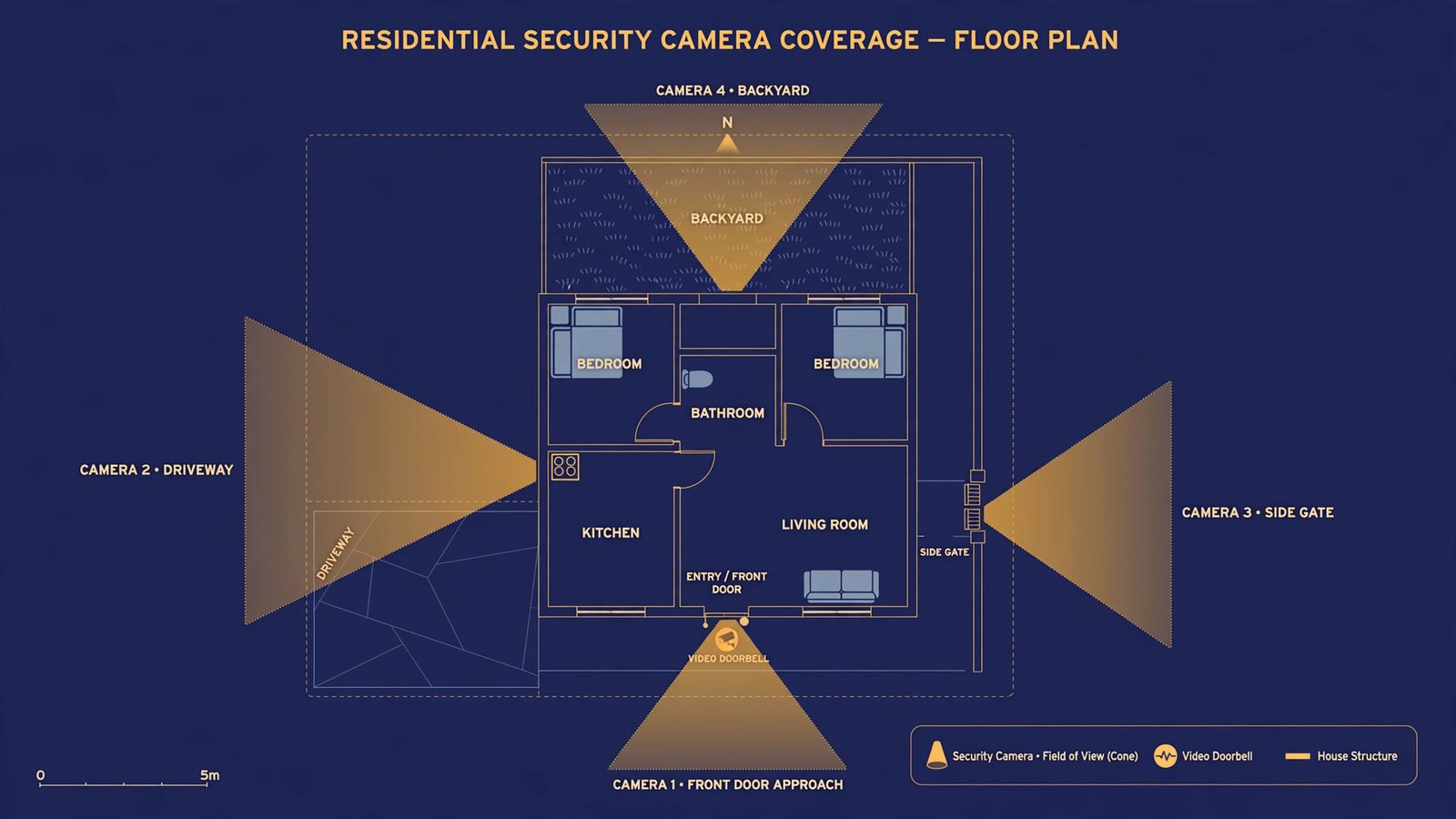
Caveat: point cameras at your property, not your neighbor’s windows, and think hard about indoor cameras. They are useful for pet checks and entryways, but avoid placing them where they capture sensitive private activity. Use strong, unique passwords on every camera account, turn on two-factor authentication, and keep firmware updated; an unpatched camera is a window into your home, not a guard at it.
Layer 3: Upgrade to Smart Locks and Sensors
Smart locks solve the oldest home-security problems: lost keys, hidden spare keys, and wondering whether you locked up. In 2026, look for fingerprint or PIN access, automatic locking, tamper alerts, temporary guest codes you can revoke, and a physical key backup for dead batteries. The big 2026 shift is the Matter standard: Matter-compatible locks and sensors talk to lights and cameras across brands, so a tripped sensor can flash your outdoor lights and lock every door in one automation.
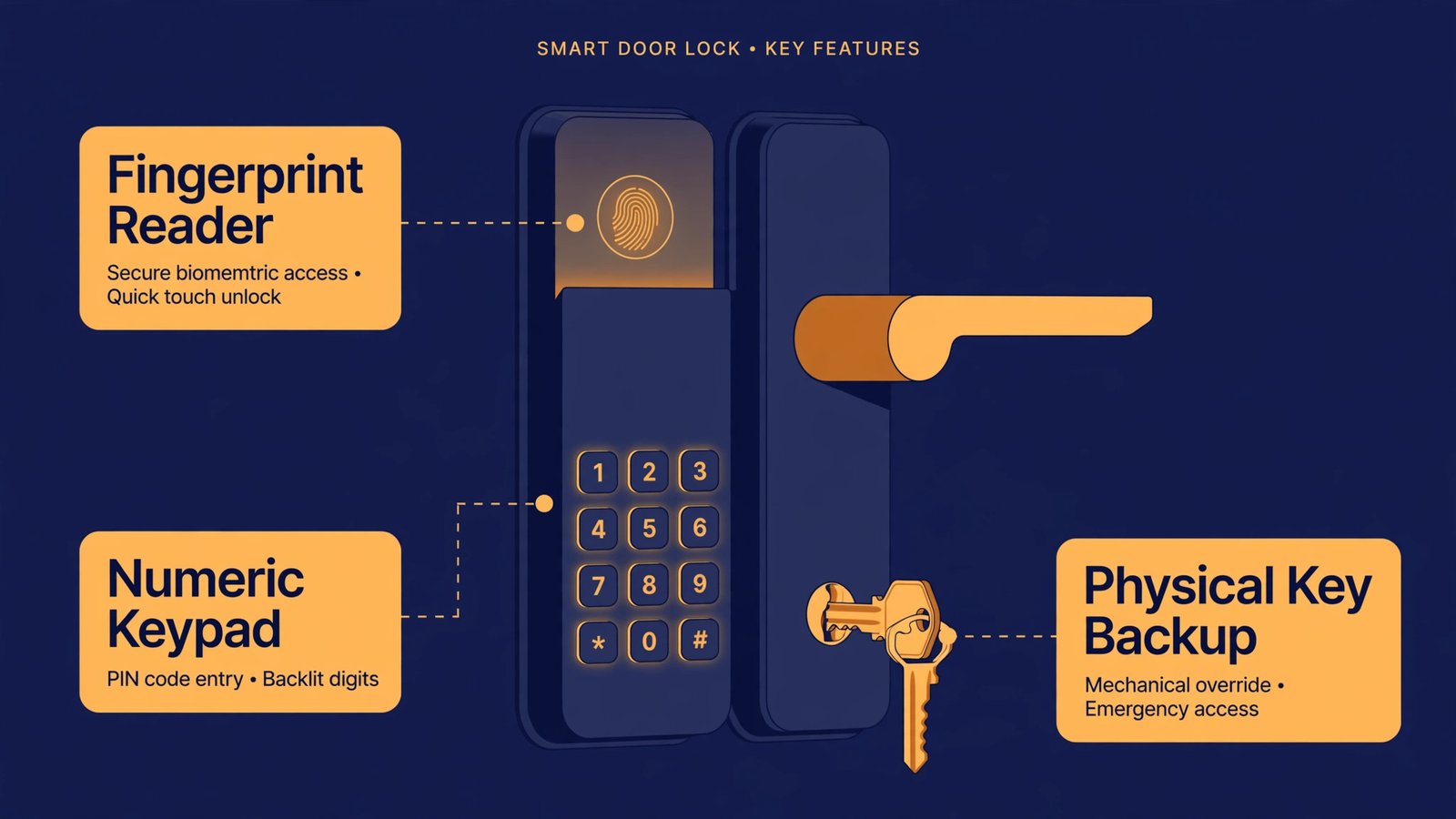
Two buying decisions matter. First, retrofit versus replacement: a retrofit lock keeps your existing deadbolt and motorizes the inside, which is the renter-safe option; a full replacement looks cleaner and usually carries a better warranty. Second, measure your door: check door thickness (usually 1-3/8 to 1-3/4 inch), backset spacing, and bore size before ordering, because not every lock fits every door. Models with built-in Wi-Fi skip the extra hub that some brands require for remote control. For inspiration on the wider smart home around your lock, browse these smart home gadgets and affordable tech gadgets for your home.
Layer 4: Light It Up and Fake Being Home
Light is a burglar deterrent that costs almost nothing. Motion-activated lighting around entry points removes the darkness intruders rely on, and dusk-to-dawn lights keep pathways visible all night. The smarter play is vacation-mode automation: smart plugs and bulbs that turn lights, a TV, or a radio on and off in lived-in patterns while you are away. A dark, silent house for a week is an advertisement; a house with lights that behave like people is not.
Caveat: keep it believable. Every light blazing at 3 a.m. looks automated. Vary the rooms and times, and put at least the key lights on a schedule that matches how you actually live.
Layer 5: Secure the Security System Itself
Connected security is only as strong as its accounts and its power supply. Give every device its own strong password and a password manager entry, enable two-factor authentication on the manufacturer’s app, and be suspicious of any unexpected email or text claiming a problem with your smart home account; open the official app yourself instead of clicking links. Then cover the boring failure modes: a small UPS or portable power station keeps cameras and your router alive through short outages, and cellular or battery backup keeps sensors reporting if the Wi-Fi drops. Finally, do not forget the non-smart basics: working smoke and carbon monoxide detectors, which protect against the far more likely threat of fire.
Caveat: technology supports good habits; it does not replace them. Lock the doors, arm the system when you leave, and check every few months that cameras and sensors are actually still online. A dead camera you assumed was recording is worse than no camera, because it gave you false confidence.
Where to Start This Weekend
You do not need all five layers at once. This weekend, do the cheap physical wins: 3-inch strike plate screws, a deadbolt check, and window film on the most exposed ground-floor glass. Next, add the video doorbell, since it is the single device that changes daily life the most. Then the smart lock, then lighting automation, and finally the account and backup hygiene that keeps the whole system honest. Layer by layer, that is a home that is genuinely harder to break into, not just better decorated with gadgets. If you want to keep expanding the smart side, these trending gadgets are a good window into what is worth adding next.

- How to Change the Screenshot Save Location on Mac - October 24, 2026
- How to Turn Off Stage Manager on Mac - October 23, 2026
- How to Reset Your Private Space PIN on Android If You Forgot It - October 22, 2026