
Telegram bots are everywhere: customer support chats, price alert bots, quiz games, reminder bots, and whole businesses running inside a chat window. The good news is that creating one is free and takes about five minutes. The slightly longer part is deciding what you want it to do.
This beginner guide walks you through the whole process: creating your bot with BotFather, making it look professional, and then connecting it to something so it actually responds. No coding required for the first two steps.
What You Need Before You Start
- A Telegram account (phone, desktop, or web version all work)
- A name for your bot, like “Sunrise Bakery Support”
- A unique username ending in “bot”, like @sunrisebakerysupportbot
- About five spare minutes
That is genuinely everything for step one. You do not need a server, a domain, or any programming knowledge to create the bot itself.
Step 1: Create Your Bot With BotFather
BotFather is Telegram’s official bot for creating and managing bots. Every bot on Telegram, and there are millions, started with a conversation with BotFather. Here is exactly what to do:
- Open Telegram on any device and tap the search bar.
- Search for @BotFather. Pick the result with the blue verification checkmark, which confirms it is the official one and not an impersonator.
- Tap Start. BotFather replies with a list of commands. You only need a couple of them.
- Send /newbot. BotFather asks what to call your bot.
- Enter a display name. This is what users see at the top of the chat. It can contain spaces and does not need to be unique, for example “Sunrise Bakery Support”.
- Enter a username. This must be unique across all of Telegram, can only contain letters, numbers, and underscores, and must end in “bot”, for example @sunrisebakerysupportbot. If yours is taken, add numbers or underscores and try again.
- Save the API token. BotFather replies with a long token that looks like 123456789:ABCdefGHIjklMNOpqrSTUvwxYZ. Copy it somewhere safe immediately.
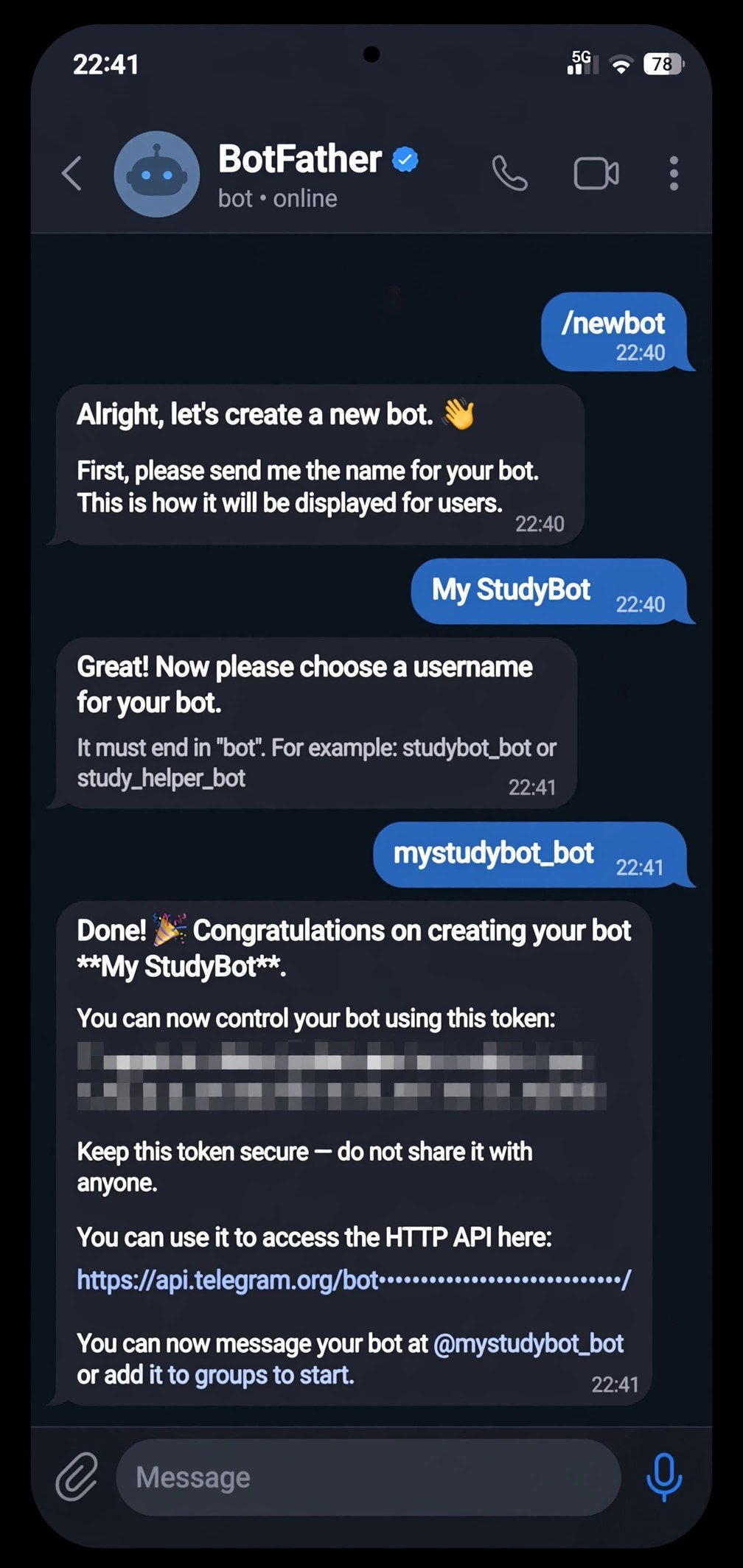
That token is your bot’s password. Anyone holding it can control your bot completely, so treat it like one: never post it publicly, never commit it to a public code repository, and if it ever leaks, revoke it with the /revoke command in BotFather and get a fresh one.
Step 2: Make It Look Like Yours
A brand-new bot looks bare: no picture, no description, no commands. A few more BotFather commands fix that in minutes:
| Command | What it does | Why it matters |
| /setdescription | Sets the “What can this bot do?” text shown before a user starts chatting | First impression for new users |
| /setabouttext | Short text on the bot’s profile page | Explains the bot at a glance |
| /setuserpic | Uploads a profile picture | Makes the bot recognizable and trustworthy |
| /setcommands | Defines the command menu behind the / button | Users tap instead of guessing what to type |
| /setprivacy | Controls whether the bot sees all group messages | Important for group bots, covered below |
For /setcommands, a useful starter set is: start (welcome message), help (list of commands), and whatever your bot’s main action is. Once set, users see these as tappable buttons in the chat, which makes your bot feel professional instead of experimental.
Step 3: Make It Actually Do Something
Right now your bot exists but does nothing: it will not reply to messages. This is where you connect it to a brain. You have two paths, and the right one depends on whether you code.
Path A: No-Code Bot Builders
Platforms like ManyChat, BotPress, and similar visual builders let you design conversation flows with drag and drop: if the user says X, reply with Y, offer buttons, collect answers. You paste your BotFather token into the builder once, and it handles the Telegram connection for you.
This path suits customer support bots, lead qualification, appointment booking, and FAQ bots. You can build something genuinely useful in an afternoon without writing a line of code. For marketing-flavored bots, our AI marketing tools guide covers complementary options.
Path B: Code It Yourself With the Bot API
Telegram’s Bot API is a straightforward HTTPS interface: your code sends requests to api.telegram.org with your token, and Telegram delivers messages to you. The two connection modes are polling, where your script repeatedly asks Telegram “any new messages,” and webhooks, where Telegram pushes messages to your server.
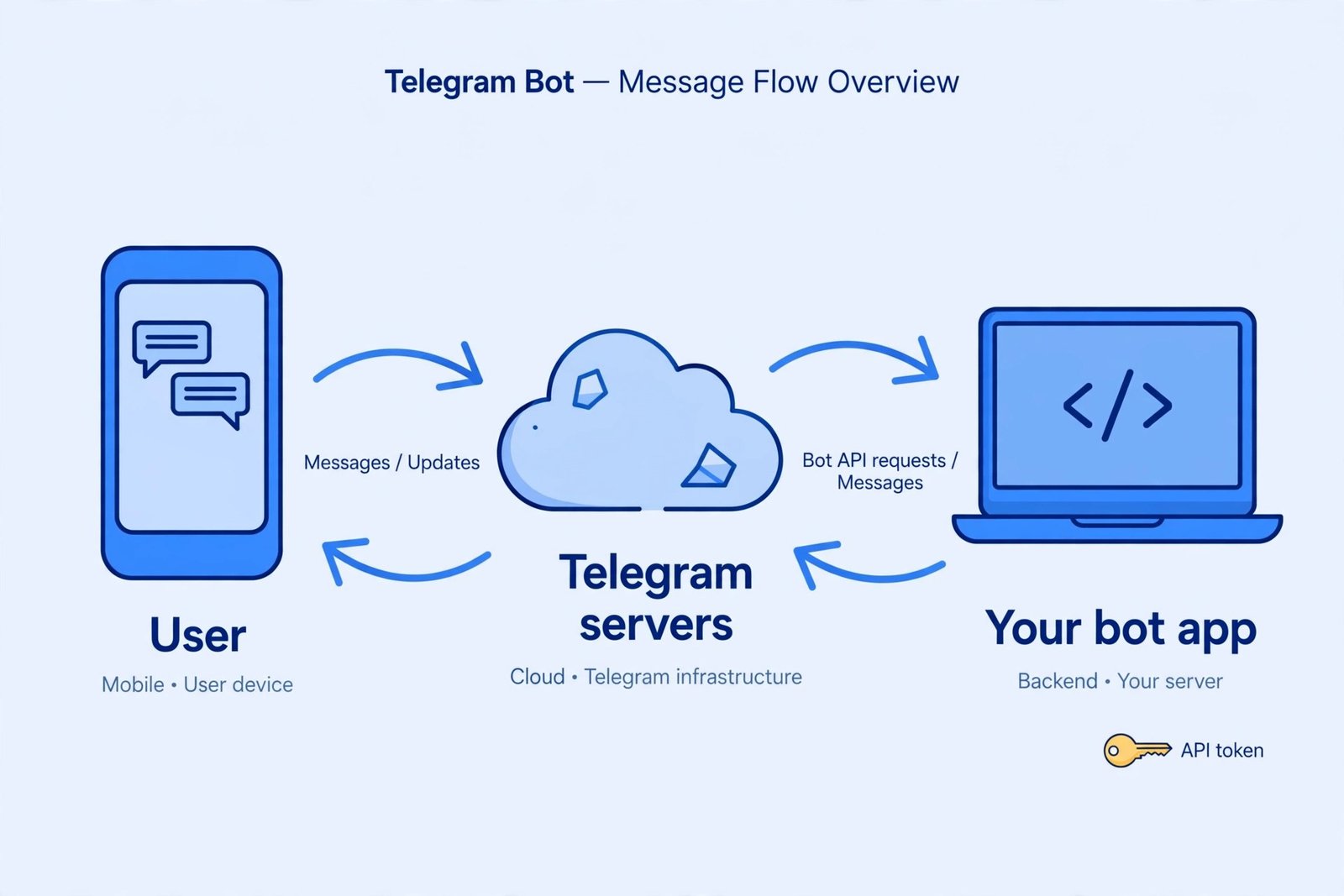
Polling needs no public server and works fine for learning and small bots. Webhooks are more efficient for production but require a public HTTPS URL. Popular libraries like python-telegram-bot handle the plumbing so you focus on the conversation logic. A minimal test is fetching https://api.telegram.org/bot<YOUR_TOKEN>/getUpdates in a browser, which shows recent messages sent to your bot.
If you are considering the developer path seriously, our DevOps engineer roadmap maps out the broader skills involved in running services like this in production.
Adding Your Bot to a Group
To add your bot to a group, just add it like any member from the group settings. One setting matters: privacy mode. By default, bots in groups only see messages that mention them or are commands, which is the safe default. If your bot needs to read everything, like a moderation bot, disable privacy mode with /setprivacy in BotFather. Only do this if the bot genuinely needs it, since it can see all group conversation.
Common Beginner Mistakes
- Messaging @BotFather instead of your bot when testing. Talk to your bot’s username, not BotFather.
- Sharing the token in screenshots. Blur it in any tutorial or help request you post.
- Skipping the description and commands. Users who open a blank bot usually leave immediately.
- Building a bot nobody asked for. The best first bot solves one real annoyance: answering the same five customer questions, or pinging you when a website changes.
Frequently Asked Questions
Is creating a Telegram bot free?
Yes. BotFather, the Bot API, and basic usage are completely free with no strict rate limits for normal bots. You only pay if you add paid third-party services like a no-code builder’s premium plan or your own server hosting.
Do I need to know programming?
Not to create the bot or make it look professional. You only need programming, or a no-code builder, when you want it to respond intelligently. Many useful bots are built entirely with visual flow builders.
Can my bot message users first?
Only after a user has started a conversation with it, or in groups where it is a member. Bots cannot spam strangers: Telegram requires the user to opt in by pressing Start first. This is a feature, not a limitation.
Step-by-step walkthroughs from Emvigo’s 2026 beginner guide and the open-source Hermes Agent Telegram docs follow the same BotFather flow described here.
Bottom Line
Create the bot with BotFather in five minutes, dress it up with a picture and commands, then connect it to a no-code builder or your own code. Start with one job it does well. If you want broader automation ideas once the bot works, our trending AI apps roundup is a good next read.

- How to Fix Windows 11 Search Not Finding Files - October 24, 2026
- How to Fix Windows 11 Clock Showing the Wrong Time - October 23, 2026
- How to Fix File Explorer Slow to Open in Windows 11 - October 22, 2026