
A friend forwards you a photo of a flood in your city. It looks real, but something feels off. Was it taken by a photographer, or cooked up by an image generator? In 2026, you can actually check. There is a small badge, a little “cr” pin, appearing on more and more images online, and clicking it shows you the photo’s signed history.
This guide explains what that badge means in plain English, who puts it on images, and how to check any image yourself in under a minute. You do not need any special software or technical skill.
What Content Credentials look like in the wild
The little “cr” pin
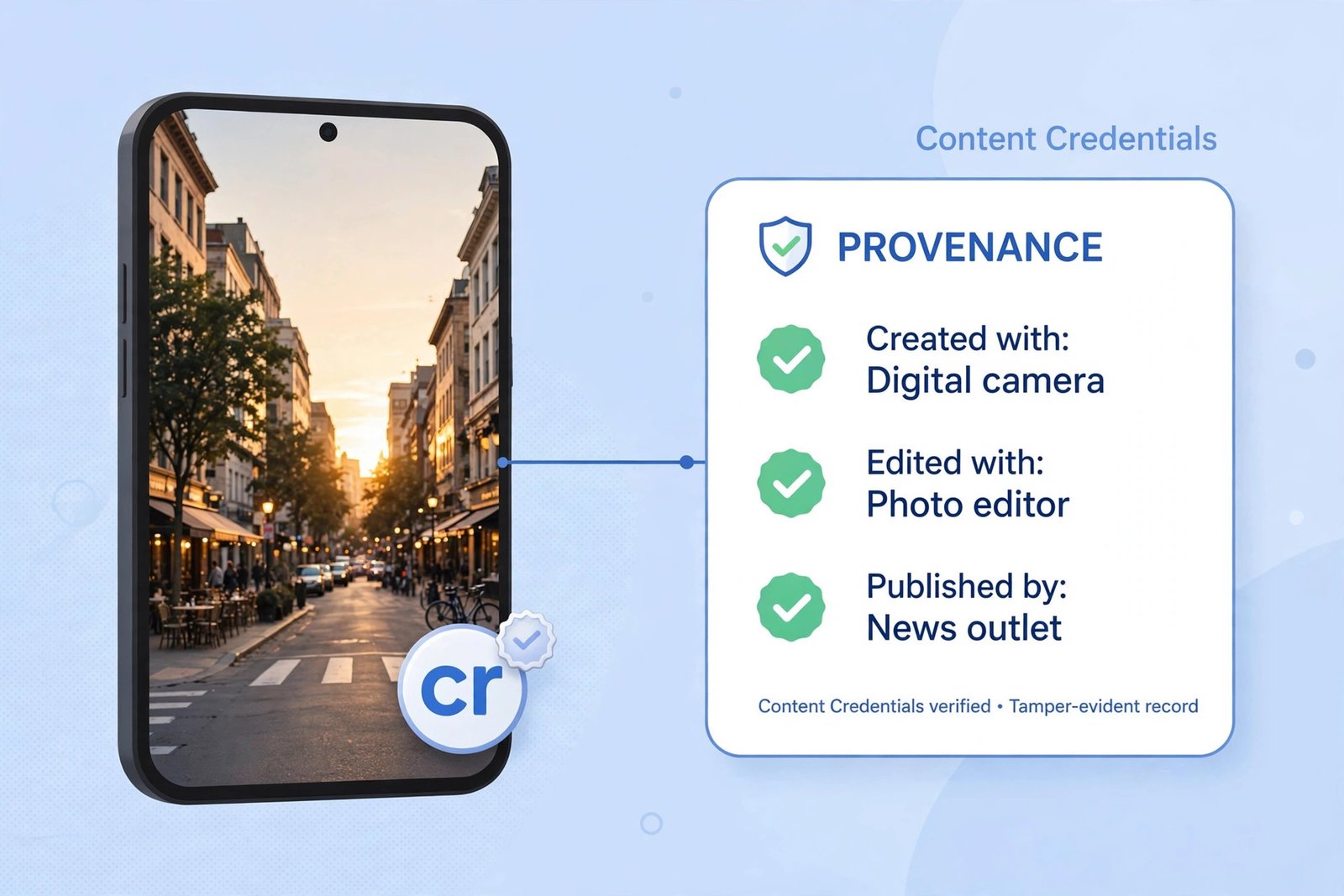
Content Credentials have a visual badge: a small circular pin with the letters “cr” inside it. You may spot it on an image in a news article, on LinkedIn, or on AI-generated pictures from tools like ChatGPT. It is quiet by design, just a tiny marker in a corner, but it is the entry point to everything else. On sites and apps that support credentials, clicking the pin opens a summary of the image’s background: the front door to the file folder behind it.
What the panel behind it shows
The panel lists facts about the file in plain rows: the tool that created the image, the camera or app it came from, the edits made along the way, and who published it. If an AI tool generated or altered the image, the panel says so directly, in entries like “Produced with: AI.” Each claim is digitally signed, so it cannot be quietly changed afterwards without the signature breaking.
What C2PA actually is, in plain English
C2PA stands for the Coalition for Content Provenance and Authenticity. It is a group of technology companies, camera makers, publishers, and platforms that agreed on one shared, open standard for recording where a piece of media came from. The group was founded in 2021 by Adobe, Arm, the BBC, Intel, Microsoft, and Truepic, and its membership has since grown into the thousands, with a steering committee that includes Adobe, Amazon, the BBC, Google, Meta, Microsoft, OpenAI, Publicis Groupe, Sony, TikTok, and Truepic.
A signed record of a file’s history
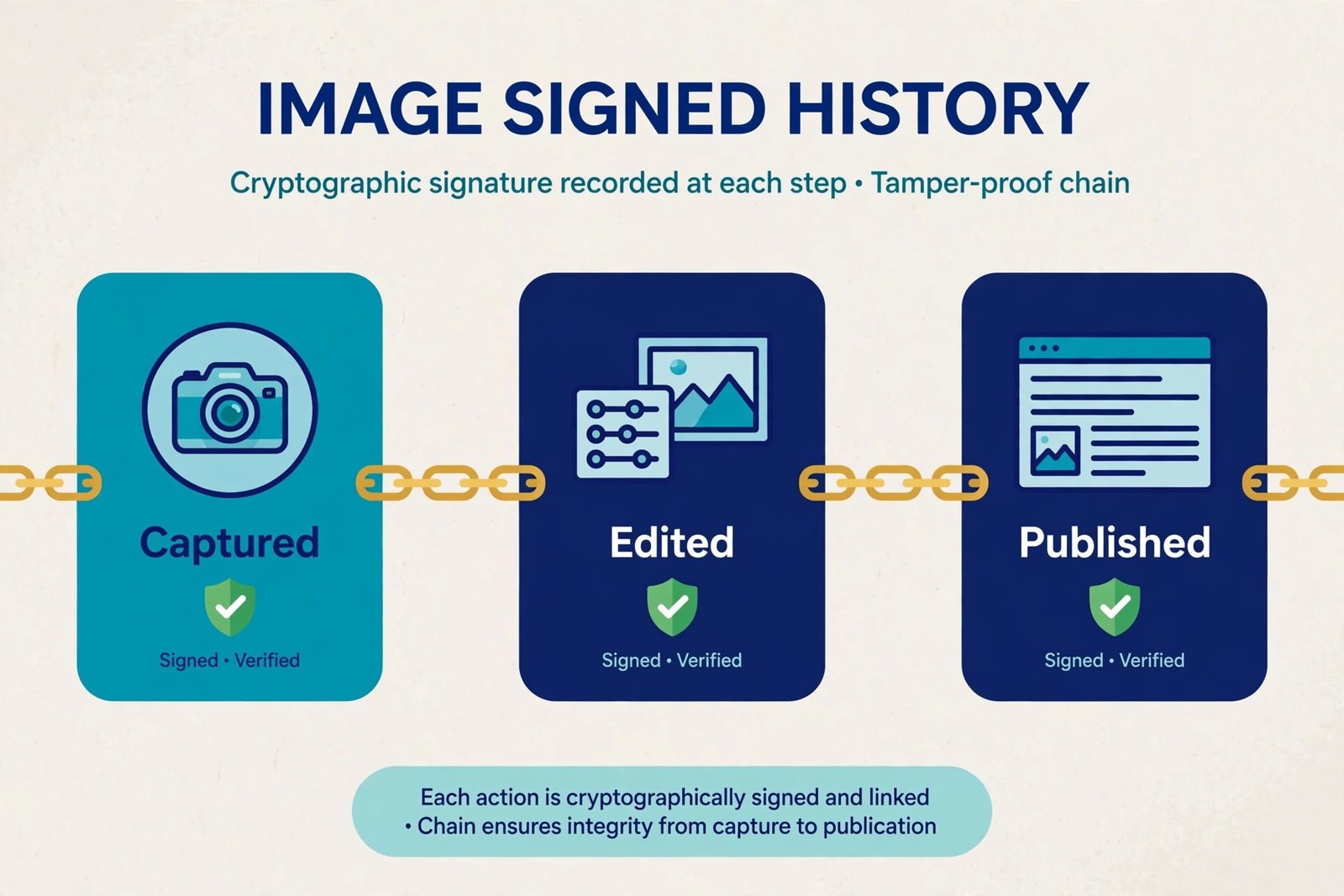
When an image is created or edited in a tool that supports the standard, the tool writes a tamper-evident record into the file, noting which camera or app made it, when, what edits were applied, and whether generative AI was involved. The record is cryptographically signed, like a sealed envelope. If anyone changes the file afterwards, the seal breaks, and checking tools flag the mismatch.
Like a nutrition label for a photo
The people behind the standard compare Content Credentials to a nutrition label. A nutrition label does not tell you whether food is delicious. It tells you what went into it, so you can judge for yourself. Content Credentials work the same way: they do not declare an image “real” or “fake.” They show the ingredients, the origin, the tools, the edits. You still decide what to believe, but you work from facts instead of a guess.
How to check an image yourself, step by step
This is the useful part. You can inspect any image for Content Credentials right now, for free, in your browser. Here is the walkthrough.
- Step 1. Open the free verifier run by the Content Authenticity Initiative. No account needed.
- Step 2. Drag and drop the image file into the page, or paste a direct link to it. JPEGs, PNGs, videos, and some documents all work.
- Step 3. Read the result. If the image carries credentials, you will see its history: who created it, with what tool, when, and what changed since. AI involvement is flagged directly.
- Step 4. Check the signature status. A valid signature means the recorded history has not been tampered with. A broken one means the file changed after signing, which is worth questioning.
- Step 5. No credentials at all? Treat that as neutral. Most images online have none yet. A missing credential is neither proof of AI nor proof of authenticity.
There are other ways to spot credentials without visiting the verifier page. On Google Search, the “About this image” panel can flag when an image was identified as AI-generated using this kind of data. LinkedIn shows the “cr” pin on images that carry credentials. Photoshop and Lightroom have a built-in Content Credentials panel, and free browser extensions can surface credentials automatically as you browse.
Who supports Content Credentials right now
A standard only works if the whole chain joins in. Here is where support stands across the main groups in 2026.
| Part of the chain | Who is on board |
|---|---|
| AI image generators | OpenAI (ChatGPT and DALL-E images carry credentials), Google (Imagen and Gemini outputs), Microsoft (Azure OpenAI models), Adobe Firefly |
| Professional cameras | Leica (M11-P, SL3-S, Q3), Sony (Alpha series via firmware), Canon (EOS R1, EOS R5 Mark II), Nikon (Z9, Z8, Zf) |
| Smartphones | Google Pixel 10 (native capture), Samsung Galaxy S25 (Galaxy AI edits) |
| Platforms and news | BBC, Associated Press, Reuters in publishing workflows; Meta and TikTok in labelling and steering; YouTube, LinkedIn, Google Search displaying or reading credentials |
AI tools and camera makers
The AI labs were early movers. OpenAI has attached Content Credentials to images from ChatGPT and DALL-E since 2024, and joined the C2PA steering committee the same year. Google attaches them to Imagen and Gemini outputs, and Microsoft does the same for images from its Azure OpenAI models. If you experiment with AI art generator apps, the files you download may already carry this history.
On the camera side, Leica shipped the first camera with built-in credentials, the M11-P, and has extended support to more bodies. Sony, Canon, and Nikon have added C2PA signing to professional models through firmware updates. Support varies by exact model, some announcements have not shipped yet, and Nikon revoked certificates for one model, the Z6 III, after a security issue. Check a specific model’s current status before assuming it signs photos.
Phones and platforms
Phones are the newest frontier. Google’s Pixel 10 records Content Credentials across photos taken with the native camera app, and Samsung’s Galaxy S25 attaches them to images edited with its Galaxy AI tools. On the platform side, Google began surfacing C2PA verification inside the Gemini app in May 2026, with Search and Chrome support announced to follow. Meta, a steering committee member, works on AI labelling across Facebook and Instagram, and YouTube and TikTok are part of the ecosystem too.
What Content Credentials do NOT tell you
Content Credentials are powerful, but they have real limits. Knowing them keeps you from reading too much into a badge, or into the absence of one.
- Credentials can be stripped. Screenshots, re-encodes, and many social media uploads remove the metadata carrying the record. A genuine image can arrive with no credentials attached.
- No credential does not mean fake. Most images online were made before this standard existed, or with tools that do not support it. A missing badge is a blank, not a verdict.
- They record the file, not the scene. A credential can prove a photo came from a real camera and was never edited. It cannot prove the scene was honest. A staged photo, a misleading caption, or a real photo shown out of context will pass credential checks.
- A broken signature needs context. Sometimes a signature breaks for innocent reasons, like a publisher resizing an image for its website. Ask what changed before assuming deception.
The big one: absence of proof is not proof of fakery
This is the misunderstanding to avoid. If the verifier says “no Content Credentials found” for a suspicious image, that tells you nothing about whether it is AI-made. It might be a screenshot of a real photo, a scan, or a genuine older picture. This matters in exactly the situations where fakes do the most damage, like deepfakes shared as screenshots, or scam listings built from AI-generated fake product photos. Provenance is one tool in the kit, alongside reverse image search, source checking, and plain common sense.
C2PA is not SynthID: keep the two separate
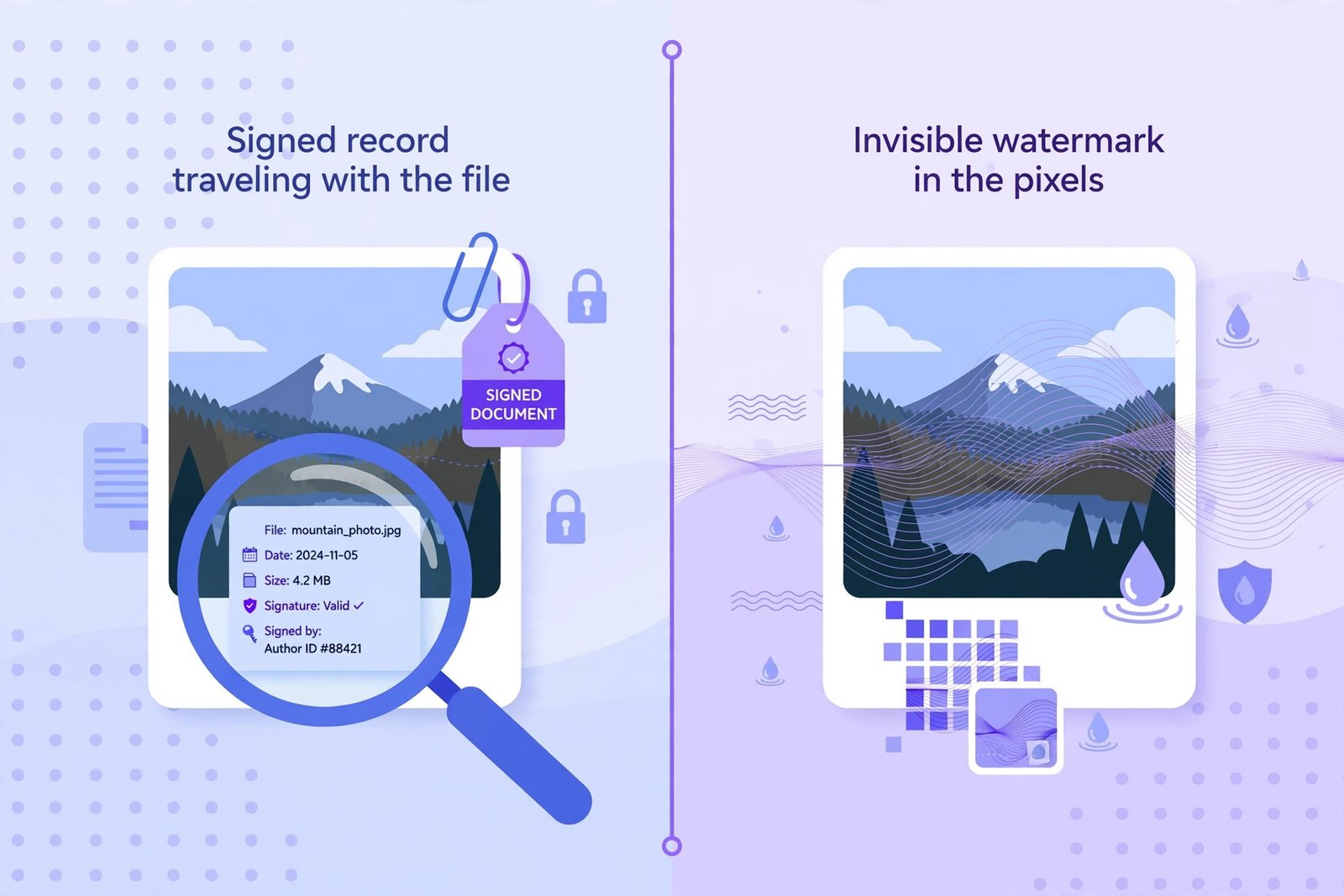
You will often hear C2PA and SynthID mentioned in the same breath. They are different technologies solving the same problem in different ways. C2PA is an open standard for a signed record that travels with the file, like a luggage tag. It says what happened to the content, and it is maintained by a broad coalition of companies. SynthID is Google DeepMind’s invisible watermarking technology: a hidden signal embedded directly in the pixels of AI-generated content. Because the signal lives inside the content itself, it can survive a screenshot, a resize, or a repost that would strip C2PA metadata away.
The two are complementary, not rivals. In May 2026, OpenAI and Google announced they would pair the C2PA manifest with the SynthID watermark on generated images, so the file carries both a signed history and a hidden signal. Rule of thumb: “watermarking” in AI discussions means SynthID-style tech; “Content Credentials” or the “cr” pin means C2PA.
The 2026 legal angle: the EU AI Act
In 2026 this stopped being just a nice-to-have for the industry. The European Union’s AI Act now requires it by law.
Article 50 of the AI Act sets transparency obligations for AI systems, and it started applying on 2 August 2026. The key part is Article 50(2): providers of AI systems that generate synthetic images, audio, video, or text must mark their outputs in a machine-readable format so the content is detectable as AI-generated. The marking has to be effective, interoperable, robust, and reliable as far as technically feasible. In practice, C2PA Content Credentials are the leading way companies meet this duty, since they are exactly that: a machine-readable, standardized mark of AI involvement.
A few details worth knowing. Systems already on the market before 2 August 2026 got a grace period until 2 December 2026 to add the marking. The Commission’s official FAQ on Article 50 lays out the timeline, and the penalties are serious: fines can reach 15 million euros or 3 percent of worldwide annual turnover, whichever is higher. The law is why credentials are spreading so fast this year. For AI providers serving Europe, marking is no longer optional.
Frequently asked questions
Can I add Content Credentials to my own photos?
Yes, in a few ways. If your camera supports C2PA signing, turn it on in the settings. In Adobe Photoshop and Lightroom, you can enable Content Credentials in export settings so your files carry your name and edit history. Some AI generators attach them automatically. You cannot add a meaningful credential to an old photo retroactively, because the signature covers the file’s history from the point of signing.
Do Content Credentials prove a photo is real?
No. They prove the recorded history of the file has not been tampered with, not that the scene in front of the lens was truthful, and they say nothing when no credential exists. Think of them as a trustworthy chain of custody, not a truth detector.
Is checking free?
Yes. The verifier at contentcredentials.org is free and needs no account. The standard is open, and the checking tools are open source. Video and audio files are covered too, though adoption in video is earlier in its journey than in photos.
The bottom line
The “cr” pin is one of the most practical answers we have to the “is this AI?” question. It will not catch every fake, and its absence proves nothing. But when the badge is there and the signature checks out, you get something rare online: a verifiable story of where an image came from. Next time a forwarded photo makes you pause, check the badge, open the verifier, and read the history before you believe, or share, the picture.

- Nintendo Switch 2: Is It Worth It in 2026? - October 18, 2026
- What Is C2PA? How Content Credentials Show If an Image Is AI-Made in 2026 - October 18, 2026
- Best Reddit Alternatives in 2026: Where to Go After the RSS and API Shutdown - October 17, 2026