Best Workout Planning Apps: A Practical Guide to Finding the Right Tool for Your Fitness Goals

The best workout planning apps depend on what you actually need. Strong is excellent for strength training tracking. Nike Training Club works well if you want guided workouts without a subscription. MyFitnessPal combines workout planning with nutrition tracking. Fitbod uses AI to customize strength workouts. For running, Strava connects you with a community. The “best” app is the one you’ll actually use consistently.

Most people waste time downloading apps and never opening them again. The real question isn’t which app is technically superior. It’s which app matches your goals, fits your schedule, and won’t gather digital dust on your phone.

What Makes a Workout Planning App Actually Useful

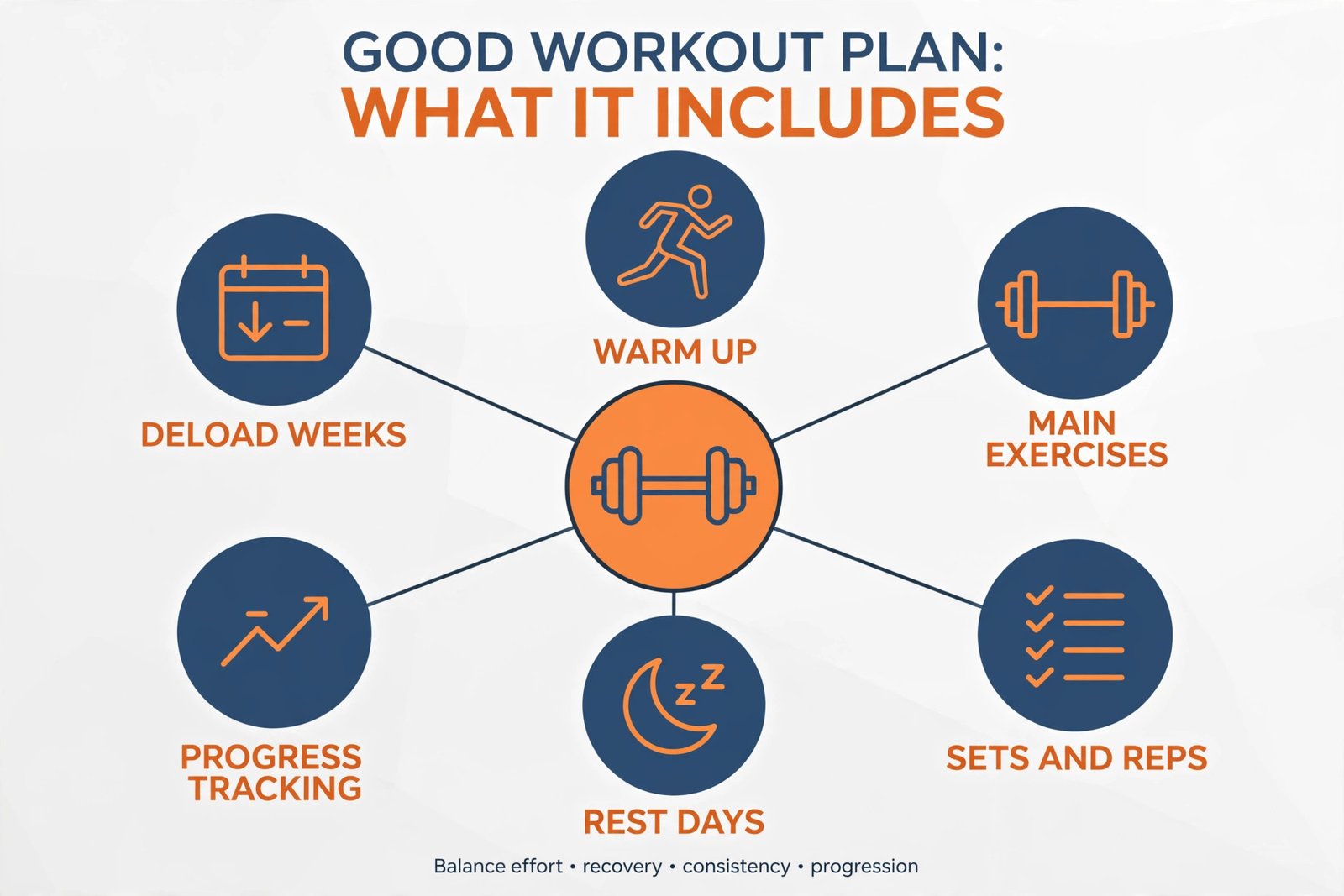
A good workout planning app does three essential things: it removes decision-making from your training, it tracks what you’ve done, and it shows progress over time.

When you open the app, you should know immediately what you’re supposed to do today. No thinking. No scrolling through endless options. Just a clear workout waiting for you.

The app should also remember your previous sessions. This matters because consistency builds strength and endurance. You need to see that you lifted 10 more pounds than last week, or ran a mile three seconds faster. That feedback motivates you to keep going.

Progress tracking is what separates mediocre apps from useful ones. Screenshots and notes don’t count. The app should automatically compare your current performance to your past performance and highlight improvements.

Key Features to Look For in Workout Planning Apps

Customization Based on Equipment and Space

Not everyone has access to a full gym. Some people have dumbbells at home. Others prefer bodyweight exercises. Others want to use machines at their local gym.

The best apps let you select your available equipment before starting. Then they build workouts around what you have.

Apps that force you to adapt generic workouts to your situation waste your time. You end up standing in the gym figuring out substitutions. That breaks your focus and rhythm.

Progressive Overload Tracking

Progressive overload is the foundation of strength gains. It means doing slightly more work each time you train the same muscle group.

A good app makes this automatic. You complete a set of eight reps at 185 pounds. Next week, the app suggests 190 pounds or nine reps. Without this built-in progression, you’ll plateau quickly and get frustrated.

Real-Time Form Feedback

Some apps include video demonstrations of exercises. Better apps let you record yourself and get form analysis.

This prevents injury. Bad form doesn’t just reduce results. It creates pain and damage that sidelines you for weeks or months.

Recovery and Rest Day Integration

Training is important. Recovery is when your body actually improves.

Apps that plan your workouts should also plan your rest days. They should tell you when to ease up based on your training volume and intensity. Without this, you either overtrain and burn out, or you’re uncertain when to push hard versus when to recover.

Personalization Algorithm

Apps like Fitbod and Strong learn your preferences and your body’s response to different exercises. They adjust recommendations based on what works for you specifically.

A generic workout works for nobody as well as a personalized one. Personalization shows the difference between following a plan and following your plan.

Top Workout Planning Apps Compared

Strong: Best for Strength Training Tracking

Strong is built specifically for people who lift weights. It’s not trying to be everything. That’s why it’s exceptional at one thing.

When you open Strong, you select an exercise. You enter your weight, reps, and sets. The app logs it instantly. The interface is minimal and fast. This matters because in a gym, you want to spend time training, not typing.

Strong shows you your one-rep max estimates based on your actual performance. It displays your total training volume. It charts your strength gains over months and years.

The weakness: Strong doesn’t provide workout plans. You need to bring your own routine. If you’re new to training, you need to know what exercises to do and in what order. Strong will track whatever you do, but it won’t tell you what to do.

Cost: $4.99 one-time purchase for the app. No subscriptions. No ads.

Best for: People who already know how to structure workouts. Strength athletes. People who want detailed tracking without monthly fees.

Nike Training Club: Best Free Option with Guided Workouts

Nike Training Club offers hundreds of workouts without requiring payment. You get coaches demonstrating exercises. Workouts range from 5 minutes to 45 minutes.

The variety is genuine. Strength days. Endurance days. Mobility work. Yoga. Everything is explained clearly, and you can modify difficulty.

See also  Best Face Swap Apps: Guide to Finding the Right Tool for Your Needs

The app doesn’t create a long-term plan for you. Each day you pick a workout that sounds good. This works if you’re flexible and self-motivated. It’s problematic if you need structure and progression.

Nike Training Club feels like having access to personal training classes. The production quality is high. The instruction is clear. The exercise variety keeps training fresh.

Cost: Free version available with limited workouts. Premium subscription is around $15 per month, though you rarely need it.

Best for: Beginners looking for guided instruction. People who like variety. People training at home with minimal equipment. Anyone testing whether they’ll actually use a workout app.

MyFitnessPal: Best for Combining Workouts and Nutrition

MyFitnessPal connects your calorie intake with your workout output. This matters because your results depend on both training and nutrition working together.

You can log workouts from their library, or manually input a workout. You log food consumed. The app calculates whether you’re in a calorie deficit, surplus, or balance. You can see correlations between your eating and your training results.

The weakness: MyFitnessPal doesn’t create intelligent workout plans. It tracks what you input, but it doesn’t adapt based on your progress. The strength training features feel like an addition to the nutrition tracking core, not a fully developed tool.

The food database is massive, which is helpful. But logging food every day becomes a chore. Many people quit using the app because they stop tracking meals after a few weeks.

Cost: Free version is functional. Premium is around $10 per month.

Best for: People who need to change their nutrition alongside their training. People open to detailed meal tracking. Anyone managing weight loss or muscle gain where calories matter greatly.

Fitbod: Best for AI-Powered Personalization

Fitbod learns from every single workout you do. It analyzes your exercise selection, your rep ranges, your recovery times. It then recommends exercises that target your weaknesses while respecting your recovery capacity.

The algorithm avoids overuse injuries by preventing excessive repetition of the same movements. It suggests variations that work similar muscles but use different movement patterns. Over weeks, this keeps you healthy and continuously improving.

Fitbod works best if you have at least some training knowledge. If you’re completely new to exercises, you’ll need video tutorials from elsewhere. Fitbod assumes you know how to perform basic lifts.

The interface is intuitive. Logging workouts is quick. The recommendations feel intelligent, not random.

Cost: Free version available. Premium is around $10 per month. Worth considering if strength training is serious for you.

Best for: Intermediate to advanced strength trainers. People who want to avoid plateaus and injuries. Anyone willing to log workouts consistently and trust the algorithm.

Strava: Best for Running and Cycling with Community

Strava tracks your runs, walks, and cycling rides using GPS. It records distance, pace, elevation, and heart rate if you have a compatible device.

The community aspect is unique. You can follow friends. You can see their recent activities. You can give kudos. You can compete on specific segments informally.

Strava doesn’t create detailed training plans for endurance athletes. It’s a tracking and social platform. For the training programming part, you need to bring your own plan or pair Strava with another app.

The social element motivates some people and distracts others. You see friends consistently hitting miles, which encourages you to keep running. Or it becomes a highlight reel that makes you feel inadequate.

Cost: Free version is sufficient for most users. Premium is around $9 per month.

Best for: Runners and cyclists. People motivated by community and friendly competition. Anyone with a wearable device or smartphone GPS. Endurance athletes more than strength athletes.

Concept2 LogBook: Best for Rowing Machines

If rowing is your primary training method, Concept2 LogBook is specifically designed for this. It connects to Concept2 rowing machines and automatically logs your workouts.

The app tracks your pace, watts, heart rate, and splits. It shows your split trends over time. You can set goals and track progress toward them.

The limitation: it’s only useful if you have access to a Concept2 rower. The app won’t help you if you’re doing general fitness.

Cost: Free to use with a Concept2 machine.

Best for: People with access to Concept2 rowers. Rowers training seriously who want detailed performance data.

How to Choose the Right Workout Planning App for You

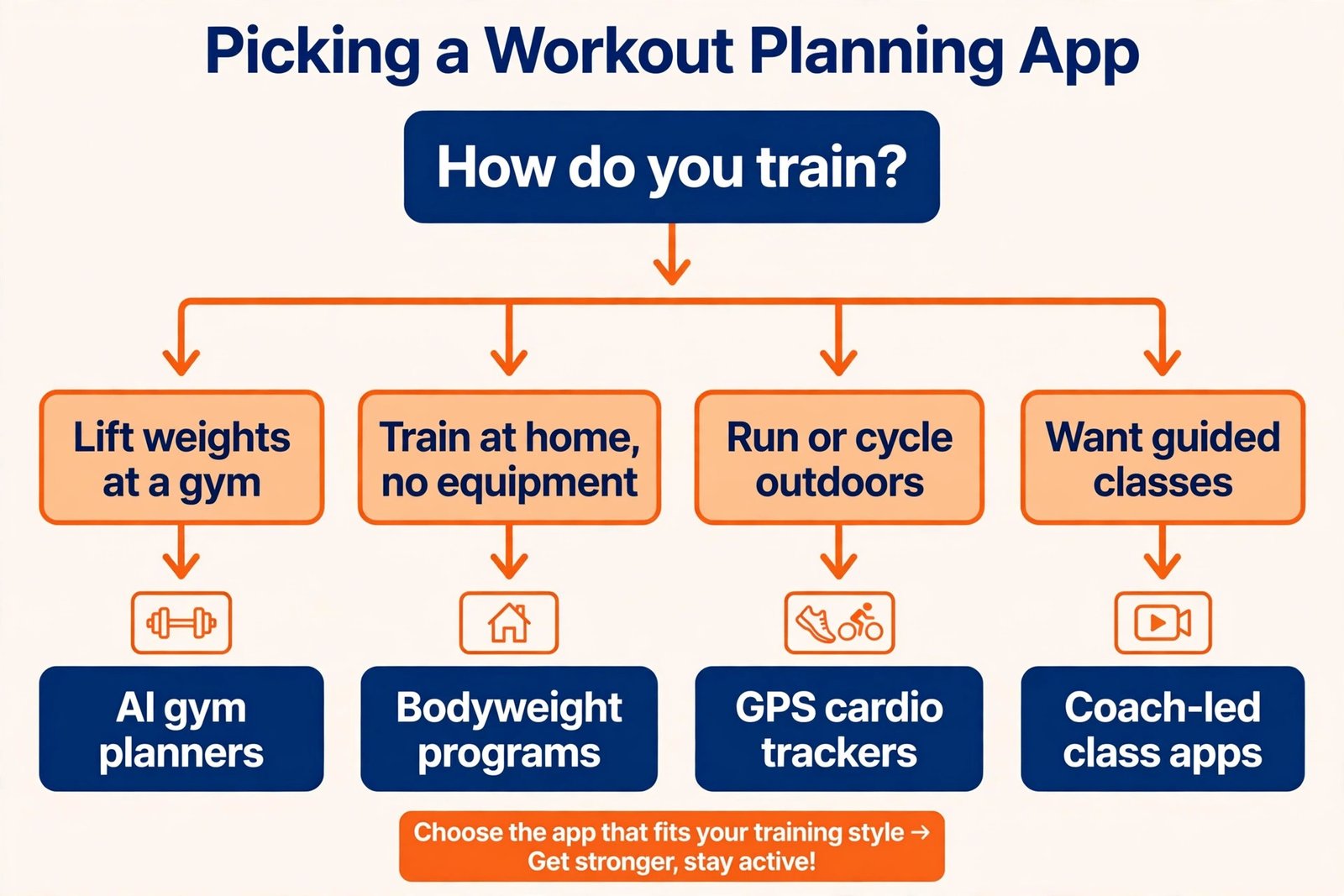
Step 1: Identify Your Primary Training Style

Ask yourself: What do I want to improve? What will I actually do consistently?

Strength training? Endurance running? Functional fitness? Flexibility and mobility?

Choose an app aligned with your primary goal. Using a running app to track strength workouts creates frustration because the app doesn’t understand your training.

See also  Best Background Remover Tools and How to Choose the Right One for Your Needs

Step 2: Assess Your Knowledge Level

If you’re new to exercise, choose an app with guided workouts and clear instructions. Nike Training Club, Apple Fitness+, or Peloton Digital work well.

If you already know how to structure workouts, choose an app that tracks and analyzes your performance. Strong or Fitbod.

If you need someone to tell you exactly what to do, pick an app with personalized programming. Fitbod or Strong with a downloaded routine.

Step 3: Consider Your Environment

Where will you train? Home, gym, outdoor?

Home training with limited equipment? Nike Training Club or Fitbod with minimal equipment.

Gym training with full setup? Strong or Fitbod.

Running outdoors? Strava or Apple Watch fitness tracking.

Step 4: Decide if You Need Nutrition Tracking

Do you need to manage your diet alongside training? MyFitnessPal.

Just focusing on workouts? Everything else listed.

Step 5: Test Before Committing

Download the free version. Use it for one full week. Does it feel natural? Does opening the app motivate you or feel like a chore?

The best app is useless if you hate using it.

How to Actually Use a Workout Planning App Effectively

Set Specific, Measurable Goals

“Get fit” is not a goal. “Increase my bench press from 185 to 225 pounds” is.

Apps need goals to structure programming around. Without goals, the app becomes a general logging tool without direction.

Set three-month goals. Check progress at the end of the period. Adjust your plan if progress isn’t happening.

Log Workouts Immediately After Training

Don’t wait until evening to log your morning workout. Your numbers won’t be accurate. You’ll forget details.

Log during or immediately after your session. The app becomes your record of what actually happened, not a memory reconstruction.

Review Your Data Weekly

Spend five minutes every Sunday reviewing the past week. Look at total volume. Note exercises that felt strong or weak. Adjust the coming week’s plan if needed.

This habit prevents mindless repetition. You train smarter, not just harder.

Don’t Change Apps Mid-Plan

Consistency in data collection matters. If you switch from Strong to Fitbod after six weeks, you lose your tracking history.

Pick an app and commit for at least three months. That’s enough time to see real progress and determine if the app truly works for you.

Adjust Based on Real Results

If the app recommends progression but you’re not recovering well, ignore the recommendation. Your wellbeing matters more than following the algorithm.

If the app suggests exercises but they cause pain, skip them. An app doesn’t know your specific injury history or body mechanics.

The best apps are tools that serve you. You’re not a slave to the algorithm.

Common Mistakes People Make with Workout Planning Apps

Mistake 1: Downloading Multiple Apps

People download Strong, Fitbod, and Nike Training Club. They switch between them based on mood. They end up with incomplete data in each app and real progress in none.

Choose one app. Use only that app for your primary workouts.

Mistake 2: Not Following the Progression Recommendations

The app says to increase weight or reps. You ignore it and repeat the same workout. You create no adaptation stimulus, so you don’t improve.

Trust the progression recommendations unless you have a specific reason not to.

Mistake 3: Skipping the Rest Days

Apps often build rest days into programs. People ignore them because they feel motivated and want to train.

Rest days are when your body improves. Training hard without adequate recovery creates injury and burnout.

Respect the app’s rest day recommendations.

Mistake 4: Not Logging Honestly

You did six reps but log eight. You used 185 pounds but log 195. Now your data is inflated. The app’s recommendations are based on false information.

Honest logging creates accurate data. Accurate data creates accurate recommendations. Accurate recommendations create real progress.

Mistake 5: Choosing Based on Interface Design Alone

An app that looks beautiful but doesn’t track metrics clearly is useless. An app that looks basic but provides intelligent feedback is valuable.

Don’t choose based on appearance. Choose based on function.

Best Workout Planning Apps by Specific Situation

For Complete Beginners

Start with Nike Training Club. The guided workouts remove decision-making. The production quality is high. You’ll build confidence through following expert instruction.

After three months, you’ll know whether you prefer strength, endurance, or mobility training. Then you can upgrade to a specialized app.

For Home Training with Minimal Equipment

Fitbod or Nike Training Club. Both work with dumbbells, resistance bands, or bodyweight.

If you have barbells or kettlebells, add Strong for detailed tracking.

See also  Search Intent: What It Is and Why It Matters for Your Content

For Serious Strength Athletes

Strong for tracking every session with precision. It becomes your permanent training log.

Add Fitbod if you want intelligent exercise suggestions and want to avoid plateaus.

For Runners

Strava for community and fun. If you’re training for a specific goal like a marathon, pair Strava with a running-specific plan from a coach or website.

For CrossFit or Functional Fitness

Strong for detailed logging. Fitbod for exercise recommendations.

Many CrossFit gyms provide their own programming, so you might just use an app for tracking their workouts.

For Busy People with 30 Minutes or Less Daily

Nike Training Club. The workouts are designed for efficiency. No long rest periods. No setup complexity.

For People Managing Injuries or Recovering from Surgery

Fitbod. The algorithm learns what movements feel good and recommends progressively harder variations safely.

Track which exercises cause discomfort. Avoid them consistently. The app can suggest alternatives.

Integration with Wearables

Many workout apps integrate with fitness watches, rings, and trackers. This adds value by automatically recording heart rate, calories, and sleep data.

Apple Watch

Works seamlessly with Apple Fitness+. Connects well with Strava. Works with most apps through HealthKit.

Garmin Devices

Excellent integration with Strava. Good integration with MyFitnessPal. Generally works across most apps.

Whoop Band

Provides recovery scores that influence training recommendations in some apps. Fitbod can use this data to suggest lighter or heavier sessions.

Fitbit

Connects with MyFitnessPal easily. Works with most major apps through standard connections.

Wearable integration is convenient but not essential. A simple smartphone app will give you 80% of the value.

Comparing Costs Across Apps

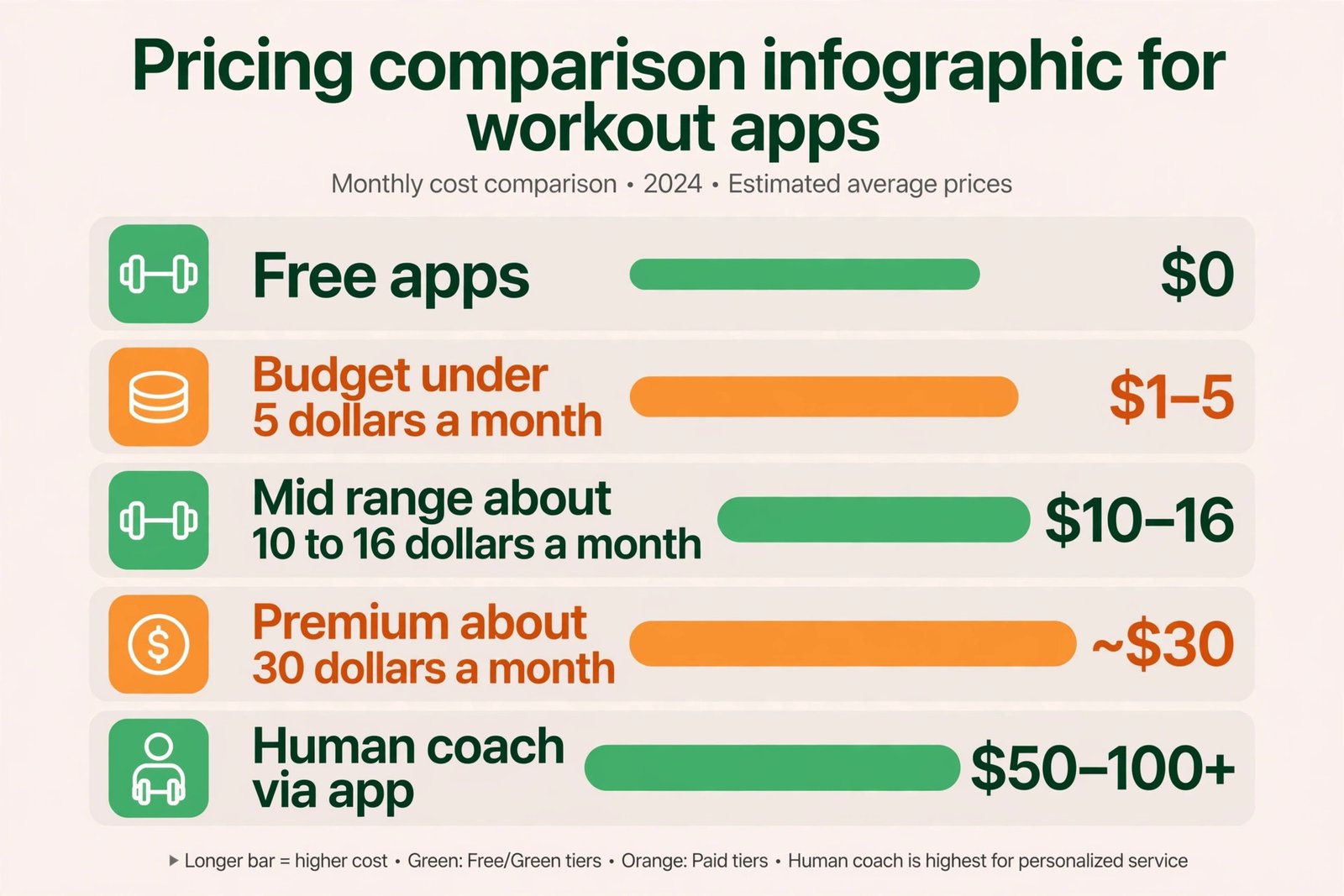
AppOne-Time CostSubscription CostFree VersionBest Value
Strong$4.99NoneNoExcellent
FitbodNone$10/monthYes (limited)Very good
Nike Training ClubNone$15/monthYes (substantial)Excellent
MyFitnessPalNone$10/monthYes (basic)Good
StravaNone$9/monthYes (functional)Excellent
Apple Fitness+None$11/monthNoGood

The cheapest option is often the best. Strong costs five dollars one time. No subscriptions. No hidden costs. You own it forever.

If you want free, all the apps above offer functional free versions. You might miss some advanced features, but you’ll see real results.

Summary and Final Recommendations

The best workout planning app combines clear programming, accurate tracking, and honest feedback about your progress. It should reduce your decision-making and increase your consistency.

For strength training: Start with Strong if you know what you’re doing. Start with Nike Training Club if you’re learning.

For running and endurance: Use Strava. Add a plan from a coach or website if you’re training for something specific.

For overall fitness and learning: Start with Nike Training Club.

For combining workouts and nutrition: Use MyFitnessPal.

For advanced strength training with personalization: Use Fitbod.

The decision doesn’t matter as much as the action. Download an app today. Use it for one week. If you like it, keep going. If you don’t, try another.

Most people spend weeks researching the perfect app instead of spending weeks using a good app. Done is better than perfect.

Your first month of consistent training with an imperfect app will produce more results than three months of research with no training.

Frequently Asked Questions

Can I use a free app and still get serious results?

Yes. The free version of Nike Training Club, Strava, or Fitbod will deliver results if you follow the workouts consistently. Premium features are nice, not necessary. Consistency matters more than which app you choose.

How long should I use one app before switching?

At least three months. This gives the algorithm time to learn your patterns and your body time to show adaptation. You need historical data to measure progress. Switching apps resets everything.

Do I need to buy a wearable to use these apps effectively?

No. Your smartphone can track most workouts. A wearable adds convenience and data, but it’s not essential. Many people get excellent results using only their phone.

What if I have multiple training goals like strength and running?

Use Strong or Fitbod for strength training. Use Strava for running. Track each separately. They serve different purposes, so using both makes sense. Just don’t use three similar apps at the same time.

Is it better to follow the app’s recommendations or my own judgment?

Follow the app’s recommendations 95% of the time. If something feels genuinely wrong or painful, trust your body. Apps are tools to guide you, not dictators. You have final decision-making authority.

Pradeep S.
Scroll to Top