
You are not choosing an email app. You are choosing who holds the keys to your inbox, and Gmail’s answer is Google. The two serious contenders to replace it are Proton Mail and Tuta, and my lean is this: Proton Mail wins for most people leaving Gmail, because its migration tools and app ecosystem make the switch painless. Tuta wins for privacy purists on a budget, because it encrypts more of your mail for less money. Below is the full spec table, then a dimension-by-dimension duel, then a verdict matched to who you are.
Proton Mail vs Tuta: Full Spec Comparison
| Spec | Proton Mail | Tuta |
|---|---|---|
| Free tier | Yes: 1 GB, 3 labels, 150 messages/day | Yes: 1 GB, unlimited folders, full-text search |
| Paid plans from | ~$3/month (Mail Plus, 15 GB) | ~€3/month billed yearly (Revolutionary, 20 GB) |
| Power-user tier | $9.99/month (500 GB + full suite) | ~€8/month billed yearly (500 GB) |
| Jurisdiction | Switzerland | Germany (EU/GDPR) |
| End-to-end encryption | Yes (OpenPGP) | Yes (post-quantum hybrid) |
| Subject lines encrypted | No | Yes |
| Desktop IMAP/SMTP | Yes, via Bridge (paid plans) | No (dedicated apps only) |
| Custom domains | Paid plans | Paid plans |
| Migration tool | Easy Switch (mail, contacts, calendar) | Importer (mail, contacts) |
| Bundled extras | VPN, Drive, Password Manager, Calendar | Encrypted Calendar |
Price, Availability, and the Free Tier Reality
Both services are genuinely free to start, which is more than Gmail’s paid Workspace tier can say, but the free plans are not equal. Tuta’s free tier is the more functional inbox: unlimited folders and full-text search from day one, which matters if you actually organize mail. Proton’s free tier gives you 1 GB shared across its apps, only three labels, and a 150-message daily sending cap, but it also hands you a taste of the wider ecosystem, including a limited VPN and password manager. If you plan to stay free forever, Tuta gives you more mailbox for zero dollars. If you plan to pay, the math favors Tuta for email-only users (20 GB at ~€3/month) and Proton if you will use the VPN and cloud storage anyway.
Round 1: Privacy and Encryption
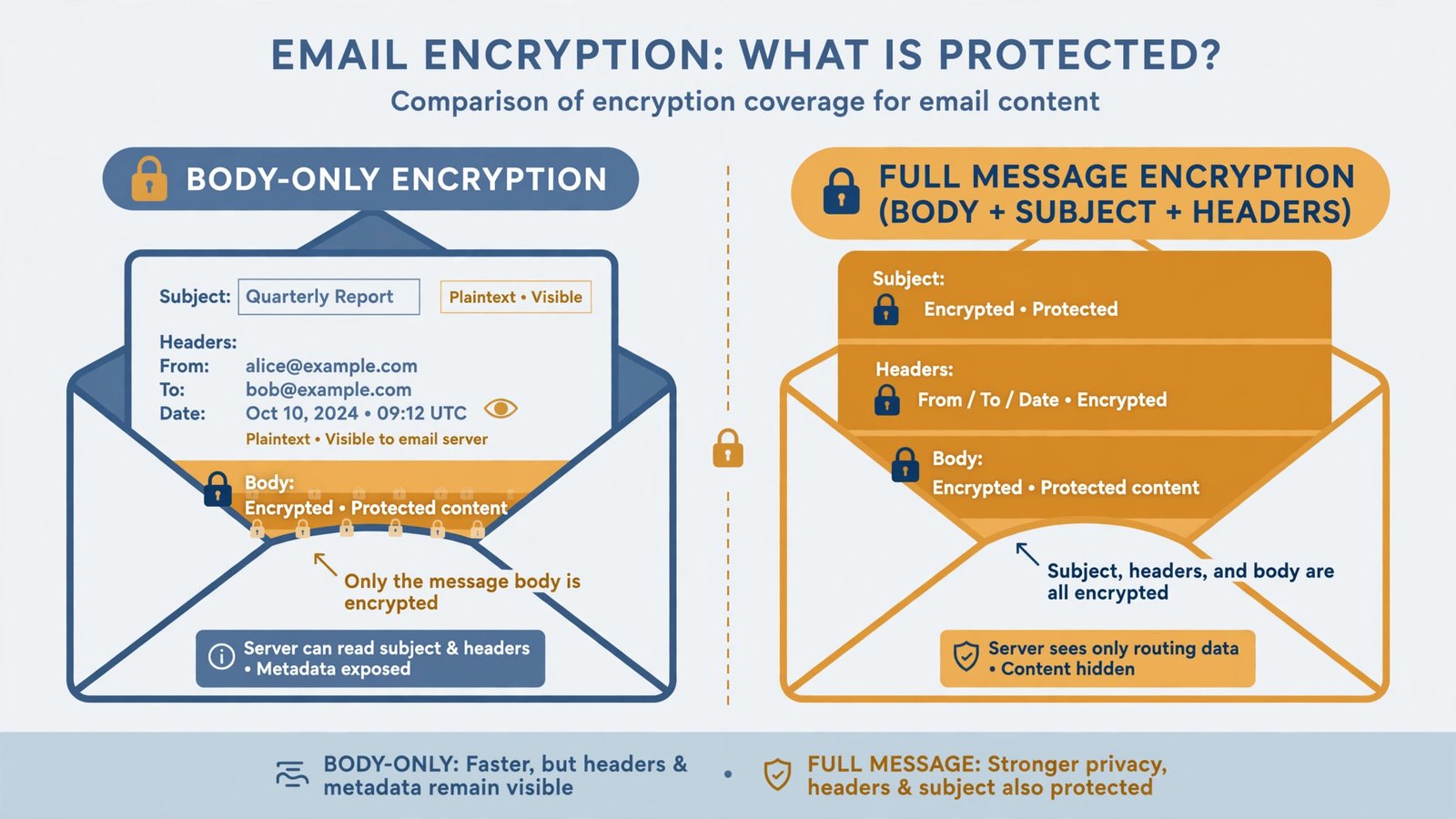
Both are zero-knowledge and end-to-end encrypted between users, which already puts Gmail’s server-side model in the rearview mirror. The difference is in the metadata. Tuta encrypts subject lines, and its newer cryptography uses a post-quantum hybrid design, while Proton leaves subject lines unencrypted and sticks with OpenPGP. On jurisdiction, Switzerland (Proton) sits outside the EU and the Fourteen Eyes, while Germany (Tuta) brings strong GDPR protections but within EU data-sharing frameworks. Neither is a bad answer. Winner: Tuta, for encrypting more of the message and future-proofing its cryptography.
Round 2: Everyday Usability
This is where the duel gets honest. Proton’s apps are polished and familiar, its Bridge app lets paid users plug into Thunderbird or Apple Mail over IMAP, and encrypted search works well enough day to day. Tuta deliberately skips IMAP entirely: you use its apps or its web client, full stop, which keeps the encryption model airtight but rules out your favorite third-party client. Proton’s mobile apps can feel slower because of encryption overhead, while Tuta’s independent push notifications work without Google Play Services, a real plus on de-Googled phones. Winner: Proton, because most Gmail refugees will not give up their desktop client without a fight.
Round 3: Leaving Gmail Behind
Proton’s Easy Switch is the gold standard here: connect your Google account and it pulls mail, contacts, and calendar entries, then you set up Gmail forwarding so nothing gets lost mid-move. Tuta’s importer handles mail and contacts competently but with less hand-holding. Whichever you pick, do the move in this order: create the new account, import everything, set up forwarding from Gmail, then update your important accounts over a few weeks before you consider deleting your Google account. Winner: Proton, by the length of its migration runway.
Also Consider: Fastmail
Fastmail is the third chair at this table and the right pick for a different person entirely. It has no free tier (a 30-day trial instead) and no end-to-end encryption; what it offers is the smoothest Gmail-like experience without Google: native IMAP, JMAP and SMTP, blazing server-side search, excellent mobile apps, and superb custom-domain support at around $3 a month billed yearly. It sits in Australia, which privacy maximalists dislike, but for usability per dollar it beats both duelists. If your goal is “Gmail, minus Google, minus the learning curve,” start your trial here. Pair the move with a proper password manager so your new inbox credentials are not also living in your old Google account.
Verdict: Which One Should You Pick?
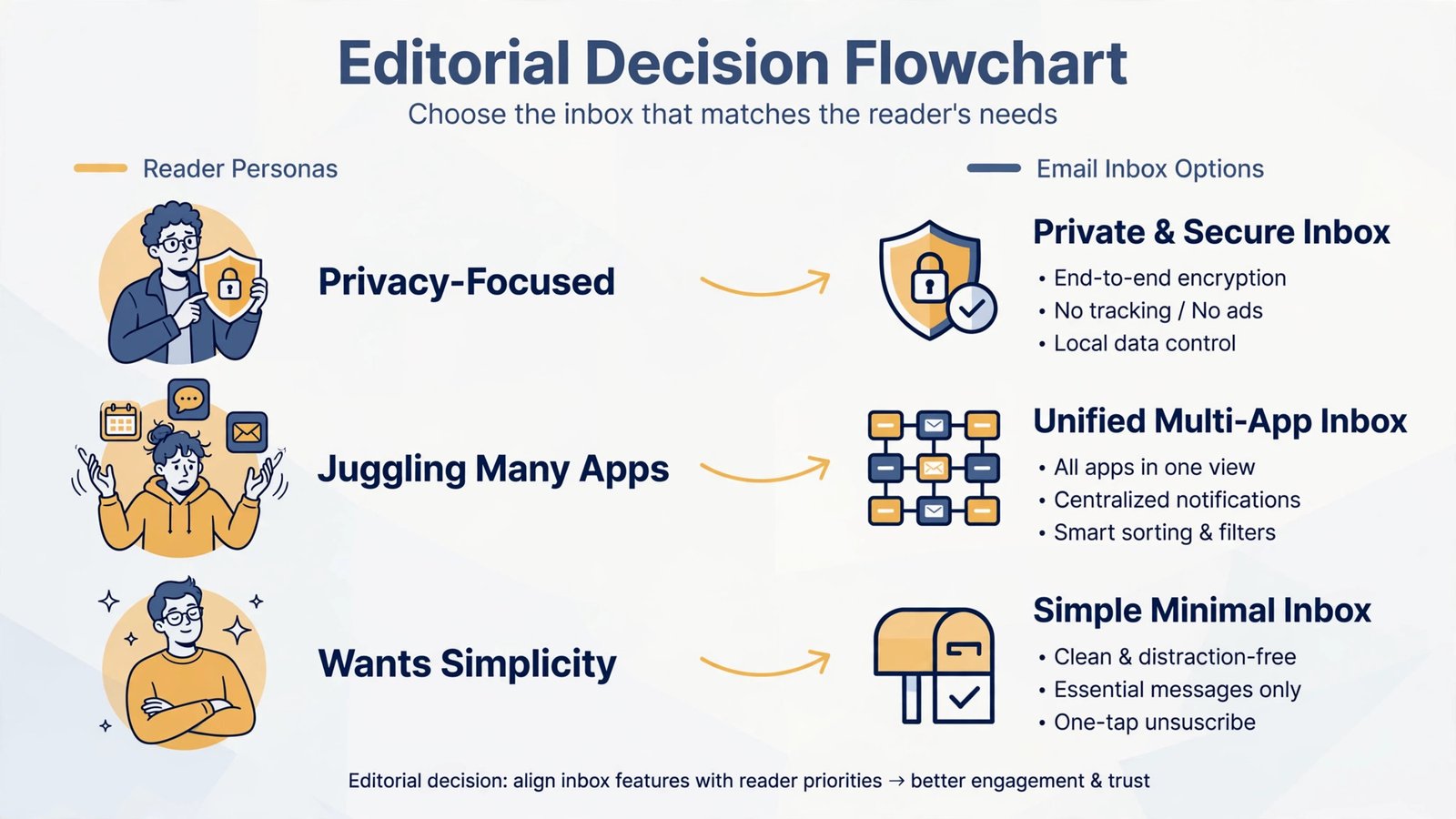
| You are… | Pick | Why |
|---|---|---|
| A privacy purist on a budget | Tuta | More encryption per dollar; best free tier |
| Replacing Google’s whole suite | Proton Mail | VPN, Drive, and Calendar in one private bundle |
| Want Gmail’s feel without Google | Fastmail | Native IMAP, fastest apps, painless domains |
| Ditching Gmail this weekend | Proton Mail | Easy Switch makes migration a non-event |
Tallying the rounds: Tuta takes privacy and free-tier value, Proton takes usability, ecosystem, and migration. For the average reader of this guide, someone who wants out of Google’s data machine without a weekend of suffering, Proton Mail is the pick. For the reader who counts every metadata field and every dollar, Tuta is the principled choice. And if you tried both and bounced off the friction, Fastmail is waiting with open IMAP arms. If Gmail is also misbehaving on your phone rather than just spying on you, these Gmail sync fixes for iPhone may solve the actual problem.

- How to Fix Windows 11 Search Not Finding Files - October 24, 2026
- How to Fix Windows 11 Clock Showing the Wrong Time - October 23, 2026
- How to Fix File Explorer Slow to Open in Windows 11 - October 22, 2026