
Wi-Fi 7 routers used to be a luxury item. In 2026 prices have dropped far enough that a solid mid-range model costs less than a Wi-Fi 6 flagship did a couple of years ago. If your internet plan is getting faster, or your house is full of phones, laptops, smart TVs, and game consoles fighting over one signal, this is a good year to upgrade.
What Wi-Fi 7 actually means
Wi-Fi 7 is the newest wireless standard (officially 802.11be). It adds speed, but the bigger win is how much smarter it is with the airwaves: less like a faster car, more like extra lanes on the highway. Prices were checked on the official manufacturer pages on 2026-10-16.
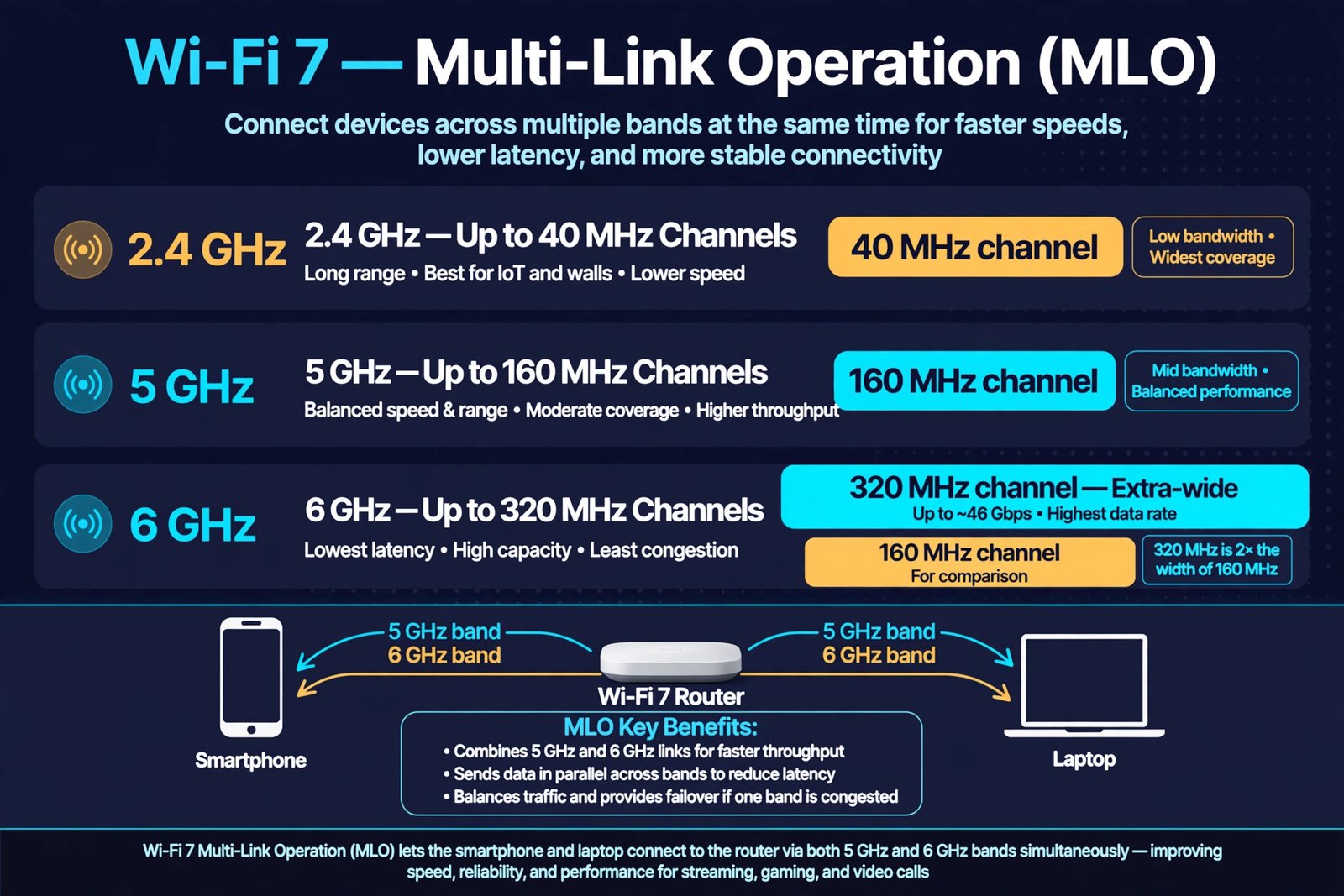
- Wider channels (320 MHz): Wi-Fi 6 used channels up to 160 MHz wide. Wi-Fi 7 doubles that to 320 MHz on the 6 GHz band, which moves more data at once.
- Multi-Link Operation (MLO): The most important new feature. A Wi-Fi 7 router can talk to a device over two or three bands at the same time, for example 5 GHz and 6 GHz together. If one band gets crowded, traffic shifts to the other without dropping, which means steadier connections and lower latency.
- 4K-QAM: The router packs about 20 percent more data into each signal than Wi-Fi 6 could, for higher real-world throughput on the same airwaves.
- Lower latency: Wi-Fi 7 handles busy networks more gracefully, so video calls, cloud gaming, and online play stay smooth even while the rest of the household streams.
- Backward compatible: A Wi-Fi 7 router works fine with Wi-Fi 6, Wi-Fi 5, and older devices. You only get the full new feature set on devices with a Wi-Fi 7 chip, such as recent flagship phones and laptops, but nothing old stops working.
How to choose the right one
Picking a router is simpler than the spec sheets make it look. Three things decide almost everything: your internet plan speed, the size of your home, and the wired ports on the box.
Match the router to your plan speed
Your router cannot deliver more speed than your plan provides. On a 500 Mbps or 1 Gbps plan, 2.5 Gbps ports are plenty, and 10 Gbps ports buy you nothing. On a multi-gig plan like 2 or 5 Gbps fiber, you need a WAN port (the one that plugs into your modem) fast enough to accept it.
Match the router to your home size
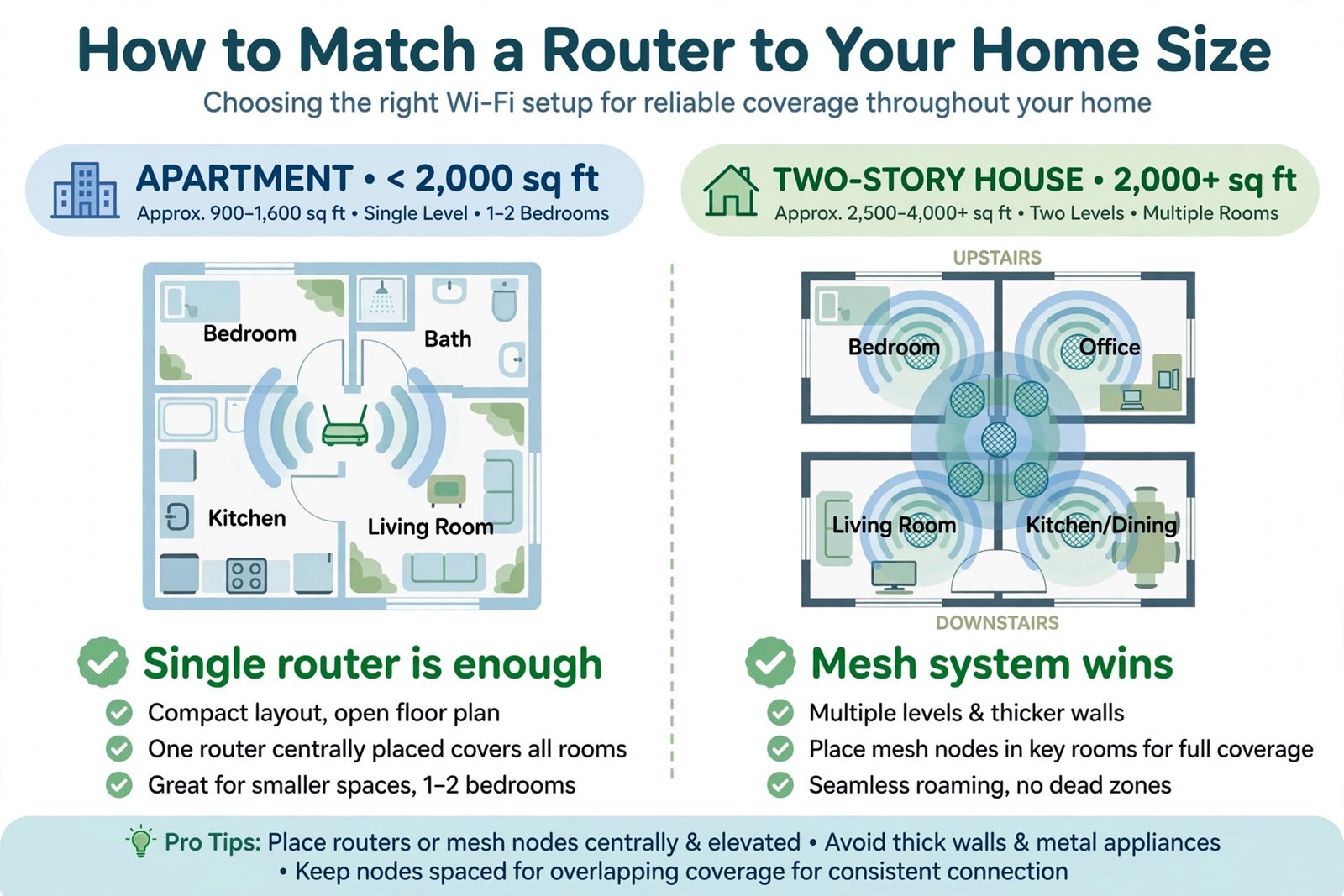
One powerful router covers most apartments and single-story homes up to about 2,000 square feet. For a bigger house, thick walls, or dead spots far from the router, get a mesh system: two or three small nodes working as one network.
Paid security subscriptions are optional
Some brands bundle a security service that charges yearly after a trial: Netgear Armor runs about $100 a year, and eero Plus runs about $99 a year for its full feature set. These add extras like advanced parental controls, but they are not required for the router to work, and ASUS and TP-Link include their basic network security tools free. Judge the hardware first, not the subscription.
One honest caveat
The fast 6 GHz band does not travel through walls well. Devices several rooms from the router will spend most of their time on 5 GHz, and that is fine. The headline speed on the box is a best-case figure, not a promise for every corner of your house.
The five best Wi-Fi 7 routers in 2026
Every pick below is a current model with its price verified on the manufacturer’s official page on 2026-10-16. Retailer sale prices can dip lower, so check for current deals before you buy.
Best overall: ASUS RT-BE96U
The RT-BE96U is the most balanced flagship on the market: tri-band Wi-Fi 7 at BE19000 class (up to about 19 Gbps combined), with two 10 Gbps wired ports so a multi-gig internet plan and a fast wired device can both run at full speed. ASUS includes AiProtection Pro security free for the life of the router, with no subscription, and the router supports AiMesh if you add nodes later. At $629.99 on ASUS’s official store page (price checked 2026-10-16), it undercuts several rival flagships while giving away nothing that matters. Price: $629.99.
- Tri-band Wi-Fi 7, BE19000 (up to 19 Gbps combined)
- Two 10 Gbps WAN/LAN ports plus four 2.5 Gbps LAN ports
- 320 MHz channels, MLO, and 4K-QAM
- AiProtection Pro security included free, no subscription
- AiMesh support for future mesh expansion
Best for gaming: ASUS ROG Rapture GT-BE98 Pro
Gamers care about one thing above raw speed: consistent low latency. The GT-BE98 Pro is a quad-band router with two separate 6 GHz bands and combined speeds up to 30 Gbps, plus ASUS’s triple-level game acceleration, which prioritizes gaming traffic on the router, your PC, and your phone. Dual 10 Gbps ports give a wired gaming rig and a NAS each a full-speed lane, and security is subscription free with AiMesh support. The spider-like design will not win beauty contests, but for a household where competitive play matters, this is the strongest spec sheet at its price. Price: $699.99 on the ASUS ROG official store page (price checked 2026-10-16; MSRP $799.99).
- Quad-band Wi-Fi 7, up to 30 Gbps combined
- Two 10 Gbps ports plus four 2.5 Gbps LAN ports
- Triple-level game acceleration and mobile game mode
- Dedicated gaming port for a wired console or PC
- Subscription-free security and AiMesh support
Best mesh: Amazon eero Max 7
For houses too big or too wall-heavy for one router, the eero Max 7 is the mesh pick. Each node is a tri-band Wi-Fi 7 unit rated BE20800, covers up to 2,500 square feet, and carries two 10 Gbps and two 2.5 Gbps Ethernet ports, so wired backhaul is never the bottleneck. It doubles as a smart home hub with Thread and Matter support, and setup through the eero app is genuinely simple. One node suits a medium home; a two or three pack blankets a large one. Price: $599.99 for one node on eero.com and Amazon (price checked 2026-10-16; recent Prime Day pricing dipped to about $420, so watch for sales).
- Tri-band Wi-Fi 7, BE20800 per node
- Up to 2,500 sq ft coverage per node
- Two 10 Gbps plus two 2.5 Gbps ports per node
- Thread border router and Matter controller built in
- Simple app-based setup; advanced features need eero Plus ($99/year, optional)
Best value: TP-Link Archer BE550
The Archer BE550 is the sweet spot for most buyers. You get tri-band Wi-Fi 7 at BE9300 class (up to about 9.2 Gbps combined), real MLO and 320 MHz support, and five 2.5 Gbps ports, enough wired speed for any plan up to 2.5 Gbps. It is EasyMesh compatible for later expansion, and TP-Link’s HomeShield basic security is free. Skip it only if your plan is faster than 2.5 Gbps, since it has no 10 Gbps ports. For the typical gigabit household, it delivers the Wi-Fi 7 features that matter at less than half the flagship price. Price: $299.99 list on tp-link.com (price checked 2026-10-16; often sells closer to $220).
- Tri-band Wi-Fi 7, BE9300 (up to 9.2 Gbps combined)
- One 2.5 Gbps WAN port and four 2.5 Gbps LAN ports
- MLO and 320 MHz channels on the 6 GHz band
- EasyMesh compatible for later expansion
- HomeShield basic security included free
Best budget: TP-Link Archer BE230
Wi-Fi 7 for about a hundred dollars is real. The Archer BE230 is a dual-band model, so it skips the 6 GHz band and its 320 MHz channels. What you do get is MLO, Wi-Fi 7 efficiency on the 5 GHz and 2.4 GHz bands, and two 2.5 Gbps ports (one WAN, one LAN) alongside gigabit ports, which is remarkable at this price. It suits apartments and small homes on plans up to 1 Gbps. Price: about $99 list on tp-link.com (price checked 2026-10-16; frequently discounted under $80).
- Dual-band Wi-Fi 7, BE3600 (up to 3.6 Gbps combined)
- One 2.5 Gbps WAN port and one 2.5 Gbps LAN port
- MLO supported despite the budget price
- EasyMesh compatible
- Best for plans up to 1 Gbps; not for multi-gig plans
Side-by-side comparison
| Router | Wi-Fi class | Bands | Fastest wired port | Best for | Price (checked 2026-10-16) |
|---|---|---|---|---|---|
| ASUS RT-BE96U | BE19000 | Tri-band | 10 Gbps x2 | Overall | $629.99 |
| ASUS ROG Rapture GT-BE98 Pro | BE30000 | Quad-band | 10 Gbps x2 | Gaming | $699.99 |
| Amazon eero Max 7 | BE20800 | Tri-band | 10 Gbps x2 | Mesh, large homes | $599.99 (1 node) |
| TP-Link Archer BE550 | BE9300 | Tri-band | 2.5 Gbps x5 | Value | $299.99 |
| TP-Link Archer BE230 | BE3600 | Dual-band | 2.5 Gbps x2 | Budget | ~$99 |
Should you upgrade now, or wait?
Wi-Fi 7 is a genuine improvement, but it is not urgent for everyone.
| Upgrade to Wi-Fi 7 now if | Waiting is fine if |
|---|---|
| Your plan is 1 Gbps or faster and your current router is the bottleneck | Your plan is under 500 Mbps and everything works well |
| You have dead spots a mesh system would fix | You bought a Wi-Fi 6E router in the last year or two |
| You game competitively and want the lowest latency | None of your devices have Wi-Fi 7 chips and your network is stable |
| You are moving or rewiring and buying gear anyway | Your main problem is the ISP connection, not your Wi-Fi |
A few setup tips
- Place the router in the open. The 6 GHz band hates obstacles. A shelf in a central room beats a closet or a cabinet behind the TV.
- Update the firmware first. Wi-Fi 7 is still young, and manufacturers keep shipping meaningful stability and MLO fixes.
- Turn on MLO if it is off by default. Some routers ship with the combined MLO network disabled; check the wireless settings in the app or web interface and enable it for your Wi-Fi 7 devices.
- Wire what you can. A gaming PC or streaming box on Ethernet always beats Wi-Fi for stability. That is what those 2.5G and 10G ports are for.
- Reset network settings if devices act strangely. After swapping routers, a phone or laptop can cling to old settings. Our guide on how to reset network settings in Windows 11 walks through a clean slate.
- Do not pay for security you do not need. The free tools built into ASUS and TP-Link routers cover the basics for most homes. Our home security guide explains the layers that actually matter.
The bottom line
For most homes in 2026, the ASUS RT-BE96U is the router to buy: flagship speeds, 10 Gbps ports for multi-gig plans, and security with no subscription. Competitive gamers should step up to the ROG Rapture GT-BE98 Pro. Big houses with dead spots belong to the eero Max 7 mesh system. And if the flagships are overkill, the TP-Link Archer BE550 at $299.99 covers typical gigabit plans, while the Archer BE230 at about $99 makes Wi-Fi 7 genuinely affordable.
Also considered: the Netgear Nighthawk RS700S ($599.99 on Netgear’s official page) is a fine BE19000 flagship, but its Armor security costs about $100 a year after the trial while ASUS includes equivalent protection free, so the RT-BE96U wins head to head. TP-Link’s older Archer BE800 and BE900 flagships are effectively superseded by the BE550 line, so they no longer make sense at their old prices.
Wi-Fi 7 does not make your internet faster than your plan. It makes your home better at sharing the speed you already pay for, with less lag when everyone is online at once.
One last note: if Wi-Fi problems persist after new hardware, check the device side before blaming the router. Start with our guide to fixing Wi-Fi that disappears in Windows.

- How to Change Screenshot Save Folder in Windows 11 - November 5, 2026
- How to Stop Samsung Galaxy Apps Running in the Background - November 4, 2026
- How to Turn Off Bixby Voice Wake-Up on Samsung Galaxy - November 3, 2026